
Choosing between DuckDB and SQLite means matching a database to the work your application does. Both are embedded database engines that run inside an application, but they target different kinds of SQL work.
I’ll compare which workloads fit each engine and show the results of the same query in both.
TL;DR: SQLite for transactions, DuckDB for analytics
Choose SQLite for application records and frequent individual reads or writes. Choose DuckDB for scans, joins, and grouped analysis across many rows.
- SQLite is a small, embedded relational database built around transactional application storage.
- DuckDB is an embedded analytical database that can process analytical queries across multiple CPU cores.
- DuckDB’s SQLite extension can query an existing SQLite file, so analysis does not require replacing the application database.
What Are DuckDB and SQLite?
DuckDB and SQLite are database engines that run inside an application instead of requiring a separate database server. Both can store data in a local file. Their designs target different kinds of SQL work.
SQLite is commonly used for application state: inserting a record, looking up one customer by ID, or updating a row inside a transaction. Its row-oriented storage keeps the fields in a record together.
DuckDB is built for analytics, such as scanning a sales table to group revenue by region. Its columnar processing reads the fields a query needs, while vectorized execution processes data in batches.
OLTP means online transaction processing: the short reads and writes that keep an application current. OLAP means online analytical processing: queries that summarize or compare a larger set of records. Both engines speak SQL, but their intended workloads differ.
SQLite remains a strong fit for a local application database, including desktop or mobile software. DuckDB fits a local analytics task where a report or transformation scans many rows. For details on combining tables in SQLite, see SQLite JOIN syntax and examples.
Row-oriented storage places the values from a record together, which suits requests that retrieve a complete record by its key. Columnar storage keeps values from the same field together. An analytical query that reads only region and amount can focus on those columns rather than processing every field in each row.
The shared SQL syntax helps you carry familiar SELECT, GROUP BY, and JOIN statements between the engines. Functions, type rules, and extension features can differ, so test the statements and values your application uses before moving a query.
DuckDB vs SQLite: Which Workload Fits Each?
Match the database to the operation your application performs repeatedly. The table below separates common transactional work from analytical work.
| Workload | Better starting point | Why |
|---|---|---|
| Look up or update one application record | SQLite | Its row-oriented transactional model suits individual records and application state. |
| Insert or update records as part of an app transaction | SQLite | SQLite provides ACID transactions and serializes writes. |
| Scan many rows for sums, groups, or joins | DuckDB | Columnar storage and vectorized execution suit analytical queries. |
| Analyze CSV, Parquet, or other external data | DuckDB | DuckDB can query supported files and data sources through its extensions. |
| Keep app data in SQLite and run occasional analysis | Use SQLite with DuckDB as needed | The SQLite extension lets DuckDB query tables in a SQLite file. |
SQLite permits multiple readers and serializes writes, so concurrent writers take turns. WAL mode lets readers and a writer work at the same time. SQLite still permits one writer at a time.
DuckDB can parallelize analytical queries across CPU cores. Its connection and file-access model should be checked against the application’s process and write-sharing needs before you choose it for shared application state.
When the application fetches a row by a key, benchmark SQLite with the indexes and transaction boundaries the application will use. When a scheduled report scans a growing table to calculate aggregates, test DuckDB on that query. Base the decision on the operations and concurrency your software needs.
DuckDB can query data from CSV and Parquet files, while SQLite commonly stores application data in its own database file. That makes DuckDB useful for a one-off analysis of exported data: a report can read selected columns and group values without first designing an application schema for the source file.
A CSV file has text fields that need type inference or explicit conversion. A SQLite database has declared columns and SQLite type affinity. Check inferred types before relying on arithmetic, date comparison, or joins.
I ran the same 10-million-row query in both
I generated ten million sales rows and grouped their amounts by ten regions with the same SQL in SQLite 3.53.1 and DuckDB 2.0.0, using Python 3.14.9. Both engines returned the same ten grouped totals.
import sqlite3, duckdb, time

N = 10_000_000
sqlite = sqlite3.connect(":memory:")
sqlite.execute("CREATE TABLE sales(region TEXT, amount INTEGER)")
sqlite.executemany(
    "INSERT INTO sales VALUES (?, ?)",
    ((f"r{i % 10}", i % 1000) for i in range(N)),
)
sqlite.commit()

analytics = duckdb.connect()
analytics.execute(
    "CREATE TABLE sales AS SELECT 'r' || (i % 10)::VARCHAR AS region, "
    "(i % 1000)::INTEGER AS amount FROM range(?) t(i)",
    [N],
)
query = "SELECT region, SUM(amount) total FROM sales GROUP BY region ORDER BY region"
for name, run in [
    ("sqlite", lambda: sqlite.execute(query).fetchall()),
    ("duckdb", lambda: analytics.execute(query).fetchall()),
]:
    start = time.perf_counter()
    result = run()
    print(name, "seconds", round(time.perf_counter() - start, 4),
          "rows", len(result), "first", result[0])
print("equal", sqlite.execute(query).fetchall() == analytics.execute(query).fetchall())
The run printed this output:
sqlite seconds 5.3125 rows 10 first ('r0', 495000000)
duckdb seconds 0.1467 rows 10 first ('r0', 495000000)
equal True
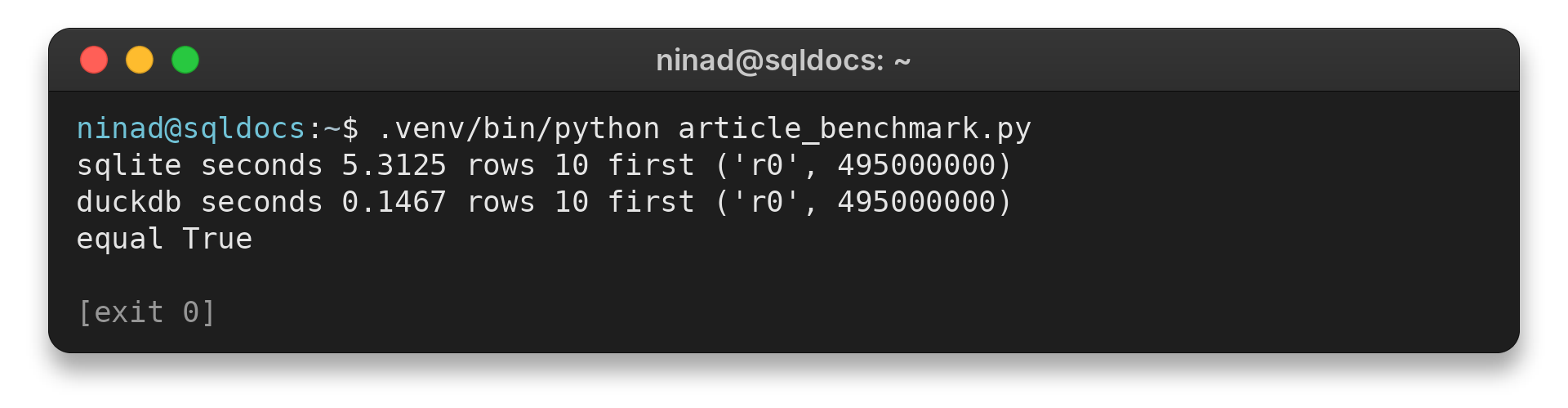
On this generated aggregation, DuckDB finished sooner. This is one run on one host, using in-memory tables, no index, and one grouped sum. It is evidence about this query on this machine, not a database-wide speed claim.
Timing also depends on whether rows are already cached, whether an index supports a filter, and how much data each query reads. A point lookup and a full-table aggregate stress different parts of a database. For a useful comparison, run each query against the same input and verify that both return the same result.
Use this style of test to compare the query your application runs. For SQLite code that writes records safely, see Python sqlite3 parameterized queries.
Read a SQLite database with DuckDB
DuckDB’s SQLite extension can attach an existing SQLite database file and expose its tables to SQL queries. This keeps the app’s SQLite file in place while DuckDB runs an analysis against it.
| Step | Purpose |
|---|---|
| Install and load sqlite | Make the extension available in DuckDB. |
| ATTACH the file | Name the SQLite database within the DuckDB connection. |
| Query the attached table | Run a report against the existing SQLite data. |
The example creates a small SQLite table, opens it from DuckDB, and groups its two records by region.
import sqlite3

source = sqlite3.connect("orders.sqlite")
source.execute("DROP TABLE IF EXISTS sales")
source.execute("CREATE TABLE sales(region TEXT, amount INTEGER)")
source.executemany("INSERT INTO sales VALUES (?, ?)", [("west", 12), ("east", 8)])
source.commit()
source.close()

import duckdb

analytics = duckdb.connect()
analytics.execute("INSTALL sqlite")
analytics.execute("LOAD sqlite")
analytics.execute("ATTACH 'orders.sqlite' AS app (TYPE sqlite)")
print(analytics.execute(
    "SELECT region, SUM(amount) FROM app.sales GROUP BY region ORDER BY region"
).fetchall())
Run the sample and inspect these points:
- The SQLite file is named orders.sqlite.
- The attached database name is app.
- The query reads sales and groups the amounts by region.
Output from the executed example:
[('east', 8), ('west', 12)]
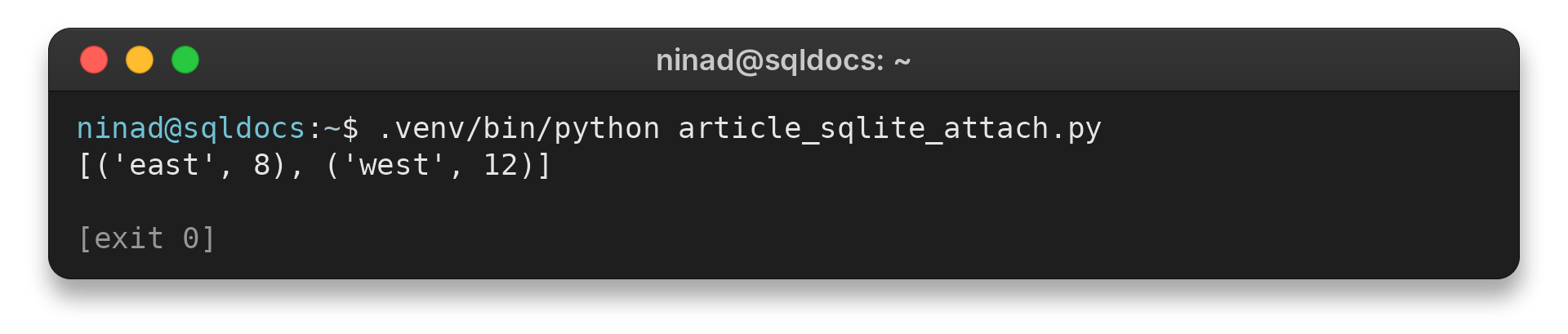
The result comes from a SQLite file created with Python’s sqlite3 module, then attached and queried with DuckDB. The extension supports reading and writing SQLite tables, so check the attached database name and target before running any write statement. For an application that only needs SQLite, there is no need to add DuckDB just to store records.
Attaching a file also helps when an analyst needs SQL joins or aggregates over application data. The app can continue storing records in SQLite, while an analysis connection reads the attached tables and writes a report to a separate output. Keep the analytical output separate from the live application file unless the workflow calls for changes to that file.
DuckDB’s extension can also copy tables between engines. That is useful for a one-time migration or export, but copying data creates a second stored copy that needs its own refresh plan. For read-only reporting, querying the attached table avoids an extra copy step.
Edge Cases: Concurrency, Types, and Benchmarks
Concurrency and type mapping can change the choice. Check how the application writes and how SQLite values map into DuckDB types.
| Case | What to check | Practical response |
|---|---|---|
| Several SQLite writers | SQLite permits multiple readers and serializes writes, so concurrent writers take turns. | Keep transactions short and test the expected write rate. Consider a client-server database if concurrent shared writes are a core requirement. |
| SQLite values do not match the declared type | SQLite uses type affinity, while DuckDB maps columns to specific types when reading. | Inspect the source values. DuckDB documents sqlite_all_varchar for reading all columns as VARCHAR. |
| Benchmark result differs from production | Indexes, storage, cache state, row count, and query shape affect timings. | Use a representative dataset and query, and compare results as well as time. |
A first query on a new DuckDB connection failed because the example table did not exist. The exact error was:
Catalog Error: Table with name sales does not exist!
Creating the table on that connection fixed the query. When a table appears missing, check which database and connection are active before changing SQL.
DuckDB maps SQLite’s declared types into DuckDB types when reading an attached database. A value that violates the inferred type can raise a mismatch error.
DuckDB’s extension guide documents the sqlite_all_varchar option, which reads columns as VARCHAR. Set it before attaching the SQLite file, then cast a column after checking its values when a calculation needs numbers.
SQLite WAL mode lets readers and a writer proceed concurrently, with one writer at a time. Applications that need concurrent writes should test their write rate and transaction duration, then evaluate a server database if that is a core requirement.
Conclusion: Choose by the Workload
SQLite is the starting point for local transactional application data. DuckDB is the starting point for analytical scans and aggregates. If both jobs matter, keep the app’s SQLite data and attach its file from DuckDB when analysis is needed.
Before deciding, run a small comparison with your schema, query, and expected concurrency. The result that matters is the one that matches your application’s work, not a single benchmark number.
For further reading, see the DuckDB SQLite extension guide and SQLite’s guide to appropriate uses for SQLite.
FAQ
These answers summarize the workload choice and the SQLite connection behavior.
Is DuckDB faster than SQLite?
DuckDB can be faster for analytical scans and aggregations, while SQLite suits point lookups and transactional application work. Actual performance depends on the query, data, indexes, and machine.
Can DuckDB read a SQLite database?
Yes. Install and load DuckDB’s SQLite extension, then attach the file with TYPE sqlite and query its tables.
Should I use SQLite or DuckDB for an application?
Use SQLite as a starting point for local application records and transactions. Use DuckDB for analytical queries across many rows; a workload may use both.