
A Python app may fail when it tries to start its SQLite database task. The sqlite3 module lets Python use SQLite, and the error names _sqlite3, the compiled part that module needs.
In this piece, I’ll show you how to check which Python your application uses and choose a repair based on how it was installed.
TL;DR: Fix No Module Named ‘_sqlite3’
Restore SQLite support in the exact Python interpreter that runs your application. Check that interpreter first, because a shell command can select a different Python from the one your app starts.
- Run a diagnostic with the same Python command your app uses. It prints the executable and the base Python.
- A virtual environment uses its base Python. Recreating it from the same build keeps the missing extension.
- For a pyenv or source build, make the provider’s SQLite development files available before rebuilding that Python.
- For a distribution-managed Python, follow that distribution’s repair instructions. Keep its system Python under the package manager’s control.
What does “No module named ‘_sqlite3′” mean?
CPython’s current sqlite3 source imports the compiled _sqlite3 extension, which connects Python’s database interface to the SQLite library.
Python’s sqlite3 documentation describes the module as optional and directs readers to their provider when it is missing. The CPython build documentation lists SQLite as a dependency for that module.
Check the Python import before installing another SQLite program, because a working command-line shell does not show whether the active Python build contains _sqlite3.
| Name | What it does | What to check |
|---|---|---|
| sqlite3 Python module | Gives Python code its SQLite interface | Import it with the interpreter that runs the application |
| _sqlite3 extension | Provides the compiled layer imported by CPython’s sqlite3 module | Check whether that Python build contains the extension |
| libsqlite3 library | Implements SQLite’s C API | Check whether its development files were present when Python was built |
| sqlite3 command-line shell | Runs SQL statements in a terminal | Its presence does not confirm Python can import _sqlite3 |
Python’s sqlite3 documentation directs readers to their Python distributor when the module is missing. The CPython build documentation lists SQLite as a dependency for the optional module. The current CPython source imports _sqlite3 from sqlite3/dbapi2.py.
How to fix the error in the Python you run
Start with the executable your application launches, then inspect its base and provider. This keeps the repair attached to the Python that failed instead of another interpreter earlier on PATH.
Step 1: Check the active interpreter and SQLite import
Save this as check_sqlite.py. Run it with the same command or virtual environment that starts your application. The script prints the selected interpreter and catches the missing-extension error without hiding its name.
from pathlib import Path
import sys


def display_path(value):
    path = Path(value)
    try:
        return path.relative_to(Path.cwd()).as_posix()
    except ValueError:
        return str(path)


print("Executable:", display_path(sys.executable))
print("Python:", sys.version.split()[0])
print("Virtual environment:", sys.prefix != sys.base_prefix)
print("Base Python:", display_path(sys.base_prefix))

try:
    import sqlite3
    import _sqlite3
except ModuleNotFoundError as error:
    print("SQLite support: missing")
    print(f"{type(error).__name__}: {error}")
    raise SystemExit(1)
else:
    print("SQLite support: available")
    print("sqlite3 module:", display_path(sqlite3.__file__))
    print("_sqlite3 extension:", display_path(_sqlite3.__file__))
    print("SQLite library:", sqlite3.sqlite_version)
With the affected environment active, run the file:
python3 check_sqlite.py
Executable: .venv/bin/python3
Python: 3.14.8
Virtual environment: True
Base Python: cpython-3.14.8
SQLite support: missing
ModuleNotFoundError: No module named '_sqlite3'
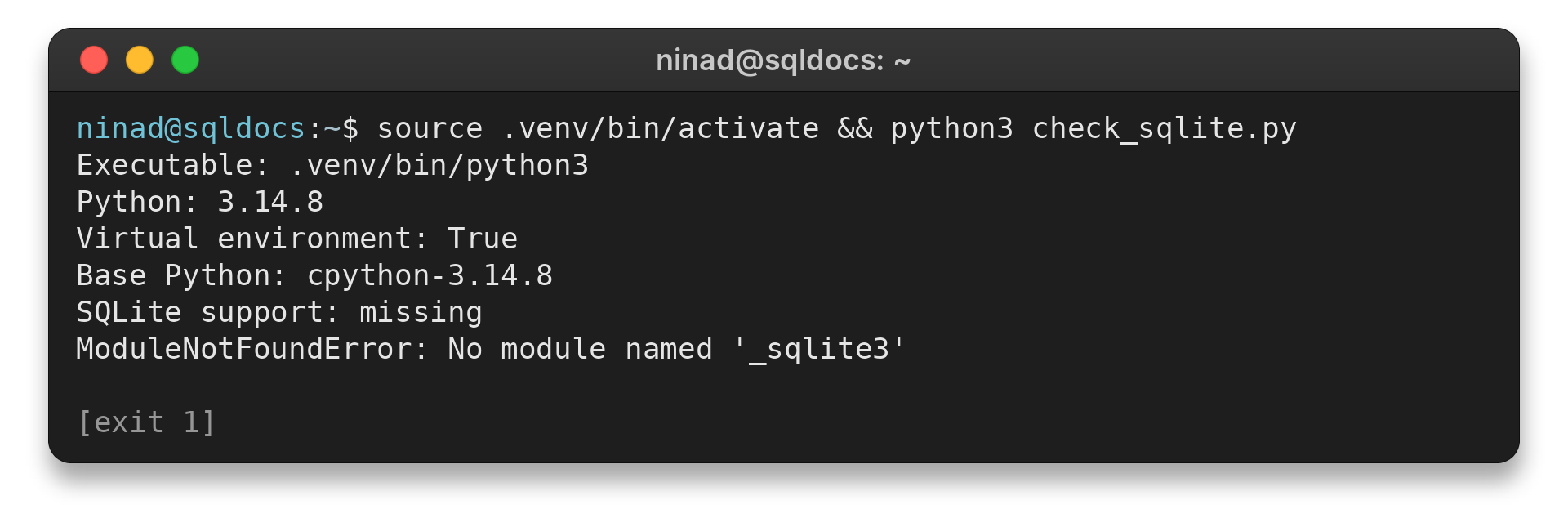
I built this isolated CPython 3.14.8 without SQLite development headers. Its configure output marked _sqlite3 disabled. The check returned the exact missing-module error.
The same check passed in a separate system-Python venv. It did not repair the CPython 3.14.8 build.
The executable line identifies the Python that ran the script. An IDE, service, or application launcher can start a different interpreter from the one a new terminal selects. If the paths differ, run the check through the application’s launcher before changing packages.
Step 2: Trace a virtual environment to its base Python
A virtual environment uses a base Python, and its pyvenv.cfg file records that installation, as the Python venv documentation explains.
from pathlib import Path
import sys


def display_path(value):
    path = Path(value)
    try:
        return path.relative_to(Path.cwd()).as_posix()
    except ValueError:
        return str(path)


configuration = Path(sys.prefix) / "pyvenv.cfg"
print("Executable:", display_path(sys.executable))
print("Virtual environment:", sys.prefix != sys.base_prefix)
print("Base Python:", display_path(sys.base_prefix))
print("pyvenv.cfg present:", configuration.is_file())
if configuration.is_file():
    for line in configuration.read_text(encoding="utf-8").splitlines():
        if line.startswith("home ="):
            print("pyvenv.cfg home:", display_path(line.partition("=")[2].strip()))
            break
Save it as venv_info.py, then run it from the affected environment:
python3 venv_info.py
Executable: .venv/bin/python3
Virtual environment: True
Base Python: cpython-3.14.8
pyvenv.cfg present: True
pyvenv.cfg home: cpython-3.14.8/bin
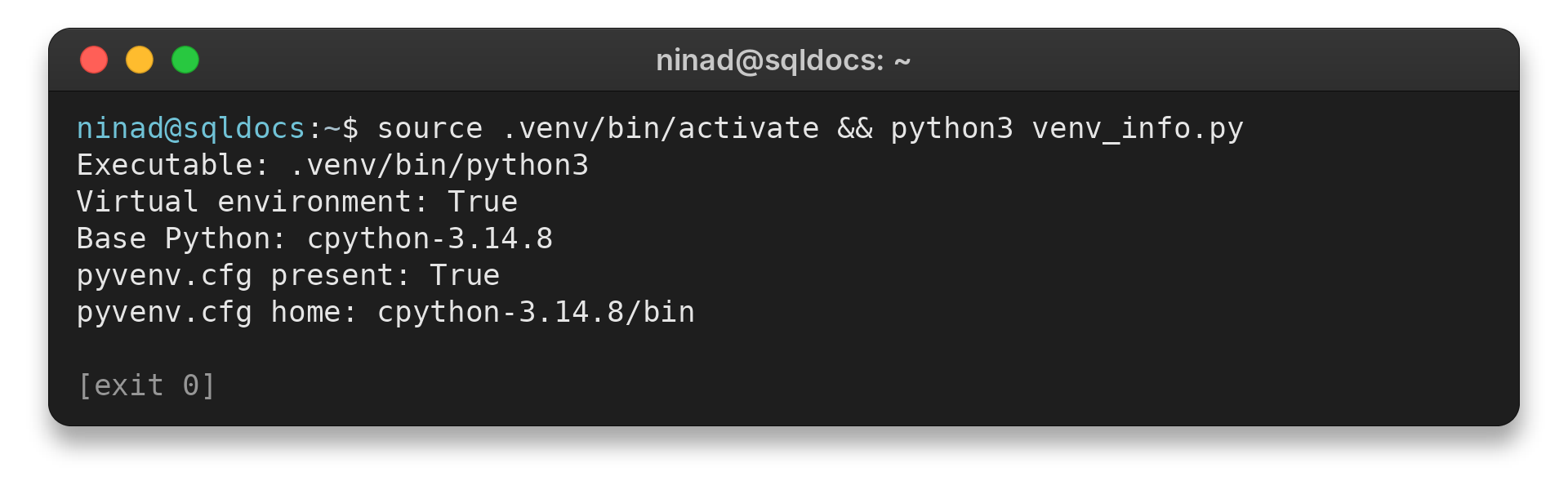
The Base Python and home lines identify the installation underneath the venv. If that is the interpreter your application launches, repair or rebuild that Python before recreating the environment.
Step 3: Match the repair to the Python provider
The provider determines which package and rebuild path apply. Use the row that matches the interpreter from your diagnostic instead of borrowing a command from another distribution.
| Python provider | What to do | Why |
|---|---|---|
| Ubuntu or Debian pyenv/source build | Install libsqlite3-dev, then rebuild the affected Python version | pyenv’s build guide lists this package for Ubuntu/Debian. Ubuntu describes it as SQLite 3 development files. |
| Fedora pyenv/source build | Install sqlite-devel, then rebuild the affected Python version | Fedora’s package page says it supplies SQLite headers and development documentation. |
| Distribution-managed Python | Use that distribution’s Python package repair instructions | The package manager owns the interpreter and its files. |
| Another provider or operating system | Check that provider’s build or installation guide | Package names and repair steps depend on the provider. |
CPython reports missing build dependencies during configure. Its build output lists optional modules that could not be built, sometimes under their internal names. Search the configuration and build output for _sqlite3 before assuming a source-built interpreter includes it.
For the two documented Linux build cases, the package commands are:
sudo apt install libsqlite3-dev
sudo dnf install sqlite-devel
Run only the command for your distribution before rebuilding its matching pyenv or source-built Python. I did not execute either package command here because they change installed system packages.
Python’s Unix guide warns that make install can overwrite or masquerade as python3. It recommends make altinstall for a source install.
Adding the development headers after Python was built does not add the extension to that existing interpreter. When pyenv reports a failed build, open the log it names and inspect the earliest error. The pyenv guide says that error typically points to the root cause.
Edge cases and safe next steps
I keep the repair at the layer that owns the missing extension, because reinstalling Django or adding the SQLite shell does not rebuild CPython.
| Situation | What it tells you | Next check |
|---|---|---|
| Django reports the import error during startup | Django can be the first code path that imports Python’s SQLite backend | Run the diagnostic through Django’s active interpreter before reinstalling Django. The SQLDocs Django SQLite guide covers the backend once Python imports its module. |
| The sqlite3 shell runs | The command-line program works, but that does not prove Python can import its extension | Run check_sqlite.py with the application’s interpreter |
| A fresh venv shows the same error | The venv uses the same base Python that lacks the extension | Compare sys.base_prefix, then repair the base build. See the SQLDocs virtual-environment guide for package isolation. |
If a provider or operating system is outside the documented cases, use its current Python build guide. Do not copy a package command from another distribution or replace the system interpreter to make the import pass.
Conclusion: Repair the Python build that lacks SQLite support
Use the diagnostic’s executable path and base Python to choose a provider-specific repair. Test the same interpreter after the repair, because a different Python can import SQLite while the one your application launches still fails.
Repeat the diagnostic with the application’s interpreter. When the import works, the script reports the extension path and SQLite library version. Continue with the SQLDocs Python SQLite tutorial to use the module.
FAQ
Keep the fix tied to the interpreter that needs the extension, because a different Python can have a different module set.
Can I install _sqlite3 with pip?
Pip cannot add a missing compiled extension to an already-built CPython interpreter. Install the provider’s build dependencies and rebuild that Python, or use its package repair instructions.
Why does a virtual environment show the same error?
A venv uses a base Python. If that base lacks _sqlite3, a new venv created from it inherits the same missing extension. Check sys.base_prefix and repair the base interpreter.