
When SQLite reports ‘no such column,’ your goal is to find the name it cannot resolve and correct the query. SQLite uses this message when a name in a SQL expression cannot be resolved as a column available from the query’s tables.
This article shows how to inspect a table’s columns and check whether a text value needs single quotes.
TL;DR: Check the name against the active table
Read the identifier after the error, inspect the table’s columns, and make the SQL name match the schema visible to the current connection.
- Use PRAGMA table_info(table_name) to list declared columns.
- Use single quotes for text values such as ‘missing’.
- Check the database path and migrations when a column exists in another copy.
| Case | Symptom | Fix |
|---|---|---|
| Typo | Name differs from table schema | Correct the identifier |
| Text value | Unquoted word treated as a name | Use a single-quoted literal |
| Stale file | Expected column absent from active database | Check path and migrations |
What Does “No Such Column” Mean in SQLite?
SQLite reports this error when a name in a SQL expression cannot be resolved as a column in the query’s available tables. For example, SELECT emali FROM users fails if the table declares email, not emali.
The final word in the error often points to the identifier SQLite could not resolve. It does not tell you whether that name is misspelled, belongs to a table left out of the query, or exists only in a different database file.
This differs from “no such table,” which names a missing table. The SQLite no such table guide covers that separate failure. An ambiguous-column error means a name matches more than one joined table, which needs a different fix.
A table definition records the column names that SQLite can resolve. The query must refer to a column exposed by its source tables, not a property name from an application model or a label from a spreadsheet.
For example, if a table defines email_address, selecting email or user_email will fail unless the query creates that result name. Compare spelling character by character, including underscores and singular or plural endings.
In a join, each table contributes its own set of names. A table qualifier makes the source explicit and helps distinguish a missing source from a misspelled column. It also makes a later query edit clearer when another table gains a column with the same name.
How to Fix SQLite No Such Column Errors Step by Step
Start with the exact identifier in the message, then test the schema and query in the same connection that produced the failure.
Check the table name as well as the column. A query can spell a column correctly and still fail if its table is aliased under another name or is absent from the FROM clause.
SQLite treats unqualified names as references to columns available in the query. With several tables, writing the table name before the column makes that relationship explicit. If the query uses an alias, use that alias as the qualifier.
Step 1: Compare the name with the table definition
For a quick check in the SQLite command-line shell, list the table definition with .schema users. From SQL, use PRAGMA table_info(users). The pragma returns one row per column, including its name and declared type.
PRAGMA table_info(users);
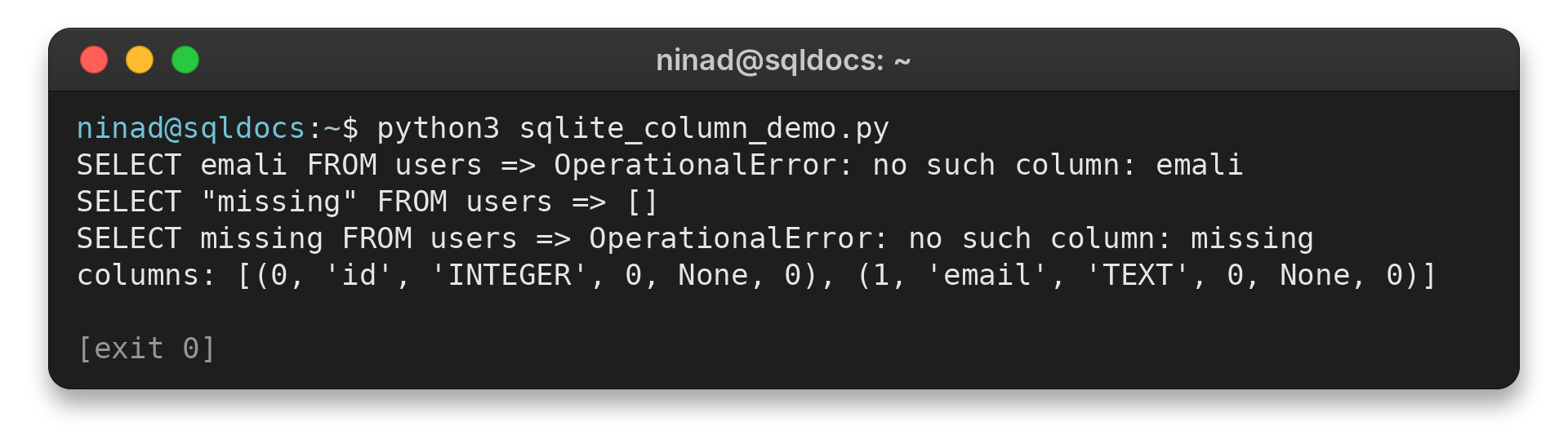
In my in-memory test, the result was [(0, ‘id’, ‘INTEGER’, 0, None, 0), (1, ’email’, ‘TEXT’, 0, None, 0)]. That confirms the table has email, so a query using emali is a typo. Keep the check pointed at the exact table and database from the failing query.
Step 2: Use a string literal for text
If the error ends with a word meant to be data, check its quotes. SQL uses single quotes for text values: write WHERE status = ‘active’, not WHERE status = active. Without quotes, SQLite reads active as a column name.
Double quotes mark identifiers. SQLite may treat an unmatched double-quoted identifier as a string under a legacy behavior. My test returned an empty result for the quoted name.
The unquoted name raised no such column: missing. Single quotes keep text values distinct from names.
SELECT 'active' AS status;
SQLite returned one row containing active. A text value is a literal, so quote it instead of making it look like a column name.
Step 3: Qualify columns used by a join
When a query reads multiple tables, qualify a column as table_name.column_name to show which source owns it. Confirm that the table containing the column appears in the query’s FROM or JOIN clause. SQLite’s SELECT documentation describes how those clauses supply rows to a query.
A SELECT alias names a result, not a stored column. If a condition cannot use that alias at its position, repeat the expression or move the calculation into a subquery.
For joins, see the SQLite JOIN examples. A qualified column names its table explicitly.
SELECT orders.id FROM orders JOIN customers ON orders.customer_id = customers.id;
This query names the source table for each identifier. Replace the names with the tables and columns in your schema.
Step 4: Confirm the connection opened the expected file
An application can open a different SQLite file from the one you inspect manually, especially when its path is relative. Print or log the resolved path in the application, then run the schema check through that same connection. A development database with a new column does not change a separate production or test file.
For Python, catch sqlite3.OperationalError while debugging and print the exception text. In my test, selecting emali produced OperationalError: no such column: emali. Use parameter placeholders for values, but remember placeholders do not stand in for table or column names.
import sqlite3

connection = sqlite3.connect("app.db")
columns = connection.execute("PRAGMA table_info(users)").fetchall()
print([column[1] for column in columns])
The printed list contains column names visible through this connection. If it differs from the schema you expect, verify the path before changing the query or altering a database.
Edge Cases: Quotes, Aliases, and Stale Schemas
When the spelling looks correct, check query scope and schema version before editing SQL at random.
Check the table name and database connection
Run a schema query through the same connection as the failing statement. In the command-line shell, the tables command lists available tables. SQL can query sqlite_schema for table definitions, then inspect columns with the table-info pragma.
SELECT name, sql FROM sqlite_schema WHERE type = 'table';
SQLite returns schema objects for the database selected by that connection. A relative path can resolve differently when an app starts from another working directory.
Log the resolved file path in the application. Compare it with the file opened in your shell.
Applications often define their expected columns in models or migration files. SQLite does not apply those files merely because they exist in the source tree. The running application must execute the migration against the file it later queries.
Development, test, and production configurations can point at separate files. Confirm the selected environment and resolved path before running a migration, then inspect the resulting schema through that same database connection.
Check the schema version before changing it
A migration may add a column to one database while another remains unchanged. Run the project migration against the file the application opens.
Verify its result by inspecting the table columns. Avoid manual changes until you identify the missing migration and expected schema version.
SELECT version FROM schema_migrations;
The migration table name varies by framework, so use the one your project defines. A missing version can explain why an older database lacks a column in your model or migration files.
A literal and an identifier have different jobs. SQLite documents the double-quoted string fallback as a compatibility quirk. Compile options can affect it.
Prefer single quotes for values.
The SQLite quirks documentation explains this fallback.
For SQL assembled by an application, keep values separate from identifiers. Bind values with placeholders. SQL parameters represent values, not identifiers.
Allow-list dynamic table or column names. Pass values separately rather than building them into SQL as unquoted words. The Python sqlite3 documentation shows the module interface.
Conclusion: Verify the Schema SQLite Actually Reads
Match the missing name to the columns available through the failing connection. That check separates a typo or quoting problem from a query-scope issue or a database file that has not received its migration.
FAQ
Common questions about the error have short answers.
What does SQLite no such column mean?
SQLite could not resolve a name in the query as a column available from its source tables.
How do I see a table’s columns in SQLite?
Run PRAGMA table_info(table_name) in the same connection that runs the failing query.
Why does SQLite say no such column for a text value?
An unquoted text value is parsed as an identifier. Put text values in single quotes or bind them as parameters.