
Checking how two SQLite databases differ starts with choosing which file is the source and which is the destination. sqldiff compares the files in that direction and prints SQL statements to make the source match the destination.
This piece shows how to read the full output and per-table summary, then check the generated SQL on a copy.
TL;DR: Compare Two SQLite Databases with sqldiff
Run sqldiff source.db destination.db to print SQL statements that change the first database into the second. Review the output before applying it, since the command reads both files and prints a script rather than changing either file.
- Use –summary for per-table row counts.
- Use –schema for table and column name differences.
- Use –table item to compare one table’s content.
What Does sqldiff Compare?
sqldiff compares two SQLite database files and writes SQL that would transform the first file into the second. The first filename is the source, and the second is the destination, so reversing them reverses the direction of the proposed changes.
SQLite pairs rows when table names match: rowid tables use rowid by default, while WITHOUT ROWID tables use their primary keys.
A paired row with changed values becomes an UPDATE. A source row without a match becomes a DELETE, and a destination row without a match becomes an INSERT.
These three SQL operations describe different row states:
| Output | When sqldiff emits it |
|---|---|
| UPDATE | A paired row has different column values. |
| DELETE | A row exists in the source but has no match in the destination. |
| INSERT | A row exists in the destination but has no match in the source. |
File order sets the direction. sqldiff pairs rows from tables with the same name and emits statements to make the source match the destination.
It prints SQL rather than a visual side-by-side report. You can read, save or test those statements.
The default comparison is about table content. It does not report differences in views or triggers, and it treats schema details narrowly. SQLite documents a separate schema comparison using the sqlite_schema table when you need more detail, but warns that the output should not be used directly to modify a database.
I kept the example small and used matching table names so each generated statement maps to a visible row change. That makes the direction of the script clear before you use the same command on larger files.
How to Compare Two SQLite Database Files
Run sqldiff with the source file first and the destination file second. The sample below uses small databases and shows how to narrow the output after the full comparison.
The sqlite3 shell and sqldiff are separate command-line tools, so the presence of sqlite3 does not prove sqldiff is available. Package names differ across operating systems and distributions. Check SQLite’s sqldiff documentation and your operating system’s package listing for the utility that matches your platform.
Use two database files that you can read and keep the target unchanged while inspecting the output. sqldiff reads both files, then prints statements without applying them. That separation lets you decide whether the proposed changes fit your task before running them elsewhere.
Step 1: Run the full comparison
The source and destination share a schema. The value for id 1 changes in the destination. The source has id 2, while the destination has id 3.
The script prints a ready line after both setup blocks, then runs the comparison:
sqlite3 inventory-old.db <<'SQL'
CREATE TABLE item(id INTEGER PRIMARY KEY, name TEXT, qty INTEGER);
CREATE TABLE note(id INTEGER PRIMARY KEY, body TEXT);
INSERT INTO item VALUES (1, 'cable', 4), (2, 'adapter', 2);
INSERT INTO note VALUES (1, 'check stock');
SQL
sqlite3 inventory-new.db <<'SQL'
CREATE TABLE item(id INTEGER PRIMARY KEY, name TEXT, qty INTEGER);
CREATE TABLE note(id INTEGER PRIMARY KEY, body TEXT);
INSERT INTO item VALUES (1, 'cable', 5), (3, 'stand', 1);
INSERT INTO note VALUES (1, 'check stock');
SQL
printf '%s\n' 'Both database files are ready.'
sqldiff inventory-old.db inventory-new.db
Both database files are ready.
UPDATE item SET qty=5 WHERE id=1;
DELETE FROM item WHERE id=2;
INSERT INTO item(id,name,qty) VALUES(3,'stand',1);
The output updates the row whose id is 1, deletes id 2 and inserts id 3. sqldiff prints SQL to standard output. Save it to a file with shell redirection when you want to review or test it separately.
Step 2: Read a per-table summary
Add –summary when you need counts before reading the SQL statements. The demo’s note table is unchanged, so the summary shows it separately from item.
sqldiff --summary inventory-old.db inventory-new.db
item: 1 changes, 1 inserts, 1 deletes, 0 unchanged
note: 0 changes, 0 inserts, 0 deletes, 1 unchanged
Start with the summary to find a table that needs closer inspection.
The item line indicates a changed row, while the note line is unchanged. The summary does not include the SQL statements behind those counts, so use the full comparison or the table filter when you need the exact values.
Step 3: Limit the comparison to one table
Pass a table name to the –table option to show content differences for that table rather than the full database. This is useful when a summary identifies one table to inspect.
sqldiff --table item inventory-old.db inventory-new.db
UPDATE item SET qty=5 WHERE id=1;
DELETE FROM item WHERE id=2;
INSERT INTO item(id,name,qty) VALUES(3,'stand',1);
The result contains the item changes and leaves the unchanged note table out. Keep the table name exact because the option selects one named table.
The filter narrows content differences to a table identified by the summary, rather than answering a schema question.
Step 4: Compare table and column names
Use –schema to show differences in table and column names without comparing table contents. In this test, the destination adds a qty column.
sqldiff --schema schema-old.db schema-new.db
ALTER TABLE item ADD COLUMN qty;
This option answers a narrow schema question. It shows table and column-name differences without row content. SQLite’s documentation also describes comparing sqlite_schema for more detailed schema inspection, but warns against using that output directly to modify a database.
Step 5: Verify the generated SQL on a copy
Start with a copy of the source. Apply the generated SQL there, then compare that copy with the destination. A clean recompare shows whether the statements reproduce the target state for this sample.
cp inventory-old.db inventory-apply.db
sqldiff inventory-old.db inventory-new.db > inventory-diff.sql
sqlite3 inventory-apply.db < inventory-diff.sql
if [ -z "$(sqldiff inventory-apply.db inventory-new.db)" ]; then
  printf '%s\n' 'No differences remain.'
fi
No differences remain.
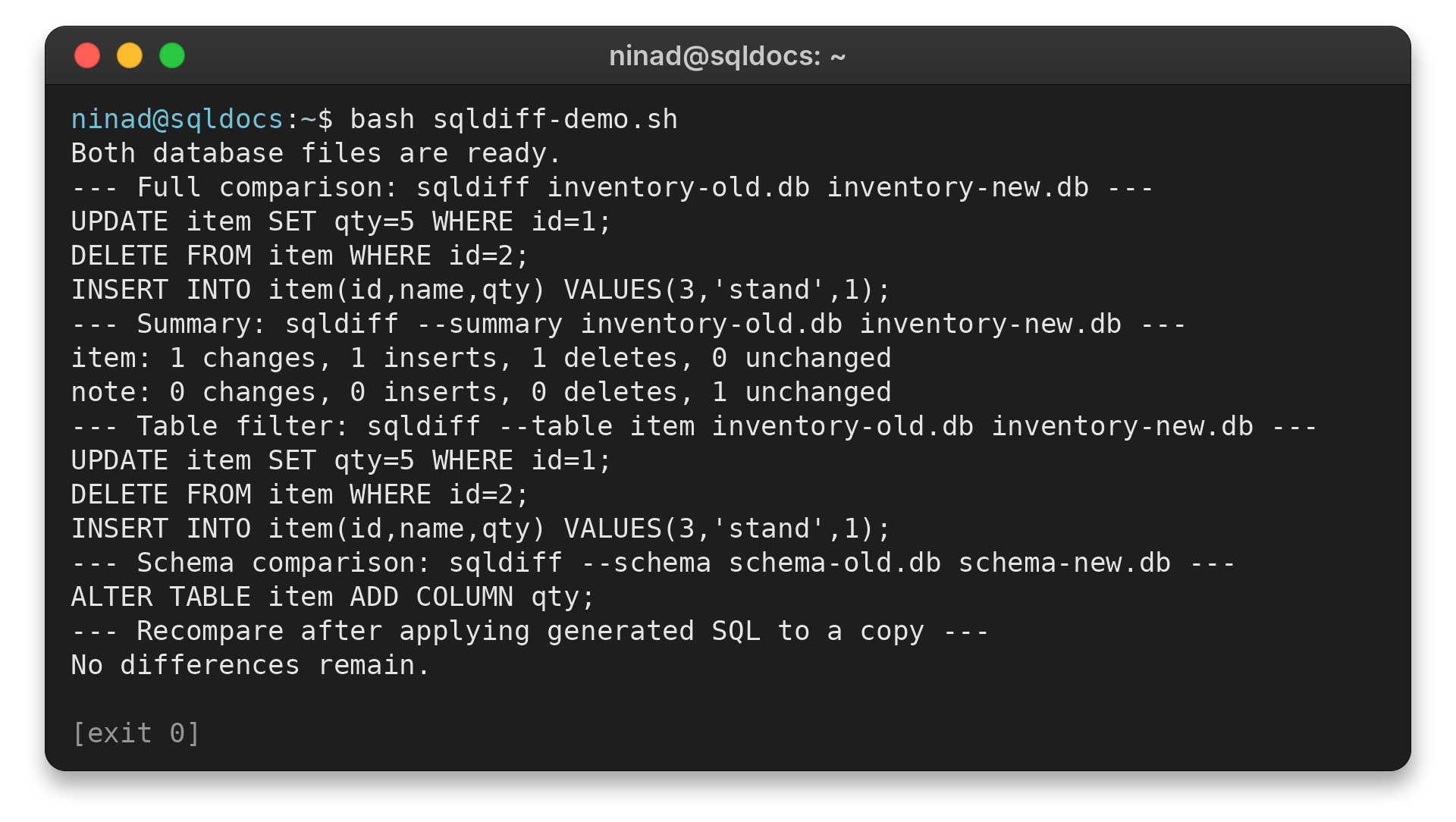
The check runs against inventory-apply.db, not inventory-old.db. If statements remain, stop and investigate the mismatch rather than running the output against your only copy.
sqldiff Options and Limitations
Choose an option that matches the question you are asking, and check the generated SQL on a copy before applying it. I keep the full comparison as the default because it shows the proposed changes, then use filters when the output needs focus.
Row matching can change the diff. A rowid table is paired by rowid by default, even if the application treats another column as its stable identifier. Use the –primarykey option when the declared primary key better identifies the same row across files.
SQLite warns that this option can miss differences when a primary-key column contains NULL. Check the key data before choosing this mode.
Generated SQL is a proposal, not a backup or a migration plan. I applied the sample output to a separate copy and ran sqldiff again to check whether any changes remained. For your own databases, preserve the original files and test the output against a disposable copy before using it on a database you rely on.
| Option | What it does | Use it when |
|---|---|---|
| –summary | Counts row differences by table | You want a quick inventory of row differences |
| –schema | Shows table and column name differences | You want a schema-name comparison |
| –table item | Limits content comparison to one table | You already know which table to inspect |
| –primarykey | Uses declared primary keys to pair rows, including tables that have rowids | Rowids differ but matching primary keys identify corresponding rows |
| –transaction | Wraps the SQL output in one large transaction | You want the emitted script wrapped as a transaction |
| –vtab | Handles supported FTS and rtree virtual tables | The database uses supported virtual tables |
SQLite’s manual notes that the –primarykey option can miss differences when primary-key columns contain NULL. I would not select it by habit. Use it when the schema’s declared keys are the right way to pair rows.
The –transaction option wraps the generated SQL in one transaction. It changes how the output script groups its statements, not which database is the source or destination. Review the script before you apply it.
sqldiff does not display differences in views or triggers. Virtual-table differences are omitted by default. The –vtab option adds support for FTS virtual tables and rtree, while shadow-table output can be unsafe if applied to a database that does not match the source.
For a different database tool or a safe copy workflow, see the SQLite commands guide and the SQLite backup guide. To inspect a table’s columns directly, use SQLite PRAGMA table_info.
Conclusion: Check the Diff Before Applying It
sqldiff writes SQL from the first database toward the second, so filename order determines the proposed changes. Review the output and test it on a copy before using it on a database you need to keep.
FAQ
These answers cover the behavior that changes how you run or trust a comparison.
What does sqldiff output?
It prints SQL statements that would transform the first database file into the second.
How do I compare only one table with sqldiff?
Pass the table name to sqldiff’s table-filter option, then provide the source and destination filenames.
Does sqldiff show differences in views and triggers?
No. SQLite’s sqldiff documentation says it does not display differences in views or triggers.