
To see which columns a SQLite table has, inspect its definition. PRAGMA table_info is a read-only SQLite command that returns one row for each ordinary column, with its name and any type or default recorded in the definition.
I’ll explain what the result fields mean and show how to inspect and filter column information in SQLite.
TL;DR: SQLite PRAGMA table_info
Use PRAGMA table_info(table_name) to inspect a table or view. It returns six fields for every ordinary column.
- cid is the column’s rank in this result, and name gives its declared name.
- type gives its declared type, while notnull records a declared NOT NULL constraint.
- dflt_value holds the default expression, or NULL when no default is declared.
- pk is zero outside the primary key, or its 1-based position within a composite key.
What is SQLite PRAGMA table_info?
PRAGMA table_info is a read-only SQLite metadata command that returns one row for each normal column in the named table or view.
The command reads the schema definition. It can return column rows even when the table contains no data, because the result describes how the table is defined rather than listing records.
The result exposes column-level properties, not every object in the schema. It gives the primary-key ordinal and any default, but does not enumerate CHECK constraints, indexes, or foreign-key relationships. SQLite provides separate PRAGMAs such as foreign_key_list and index_list for those questions.
| Field | What it tells you |
|---|---|
| cid | Column rank in this result set. |
| name | Declared column name. |
| type | Declared type, or an empty string if none was declared. |
| notnull | 1 when the column is declared NOT NULL, otherwise 0. |
| dflt_value | Default expression, or NULL when no default is declared. |
| pk | Zero outside the primary key, or the column’s position in that key starting at 1. |
For a composite primary key, pk gives each column’s position in the key. This result uses a two-column key:
PRAGMA table_info('memberships');
0|user_id|INTEGER|1||1
1|group_id|INTEGER|1||2
user_id has pk=1 and group_id has pk=2. The notnull field records a declared constraint separately from the key position. In the users result, id has notnull=0 while pk=1.
The cid value ranks each column within the current result. Use name in application code because it identifies the column declared in the table, while a schema change can alter the rank.
These fields come from the schema definition. SQLite uses a declared type to determine type affinity, but a non-STRICT table can still store values of other types in that column. Check actual values when application logic depends on their storage class.
The dflt_value field reports the default expression in the table definition. SQLite evaluates CURRENT_TIMESTAMP when an insert omits created_at.
An insert that supplies created_at keeps that supplied value.
If a column has no declared type, type is an empty string. The pragma reports the schema declaration rather than inferring a type from stored values.
For the broader task of describing a table, see SQLite Describe Table. For other settings and metadata commands, see the SQLite PRAGMA guide.
A view name works too. Because active_users selects id and email from users, its result lists those two columns and their types:
PRAGMA table_info('active_users');
0|id|INTEGER|0||0
1|email|TEXT|0||0
For a view, the rows describe the columns selected by its query. They are not a list of every source-table column. Inspect the view definition or query the source tables when you need the underlying schema.
How to inspect SQLite table columns step by step
Run the pragma in the SQLite command-line shell, then use its table-valued function when you need SQL filtering or joins. The sample includes ordinary columns and a generated email-domain column.
Step 1: Run PRAGMA table_info
Pass the table name in quotes. The command returns one row for each ordinary column.
PRAGMA table_info('users');
For a table with an integer primary key, a required email and a default timestamp, SQLite returned:
0|id|INTEGER|0||1
1|email|TEXT|1||0
2|created_at|TEXT|0|CURRENT_TIMESTAMP|0
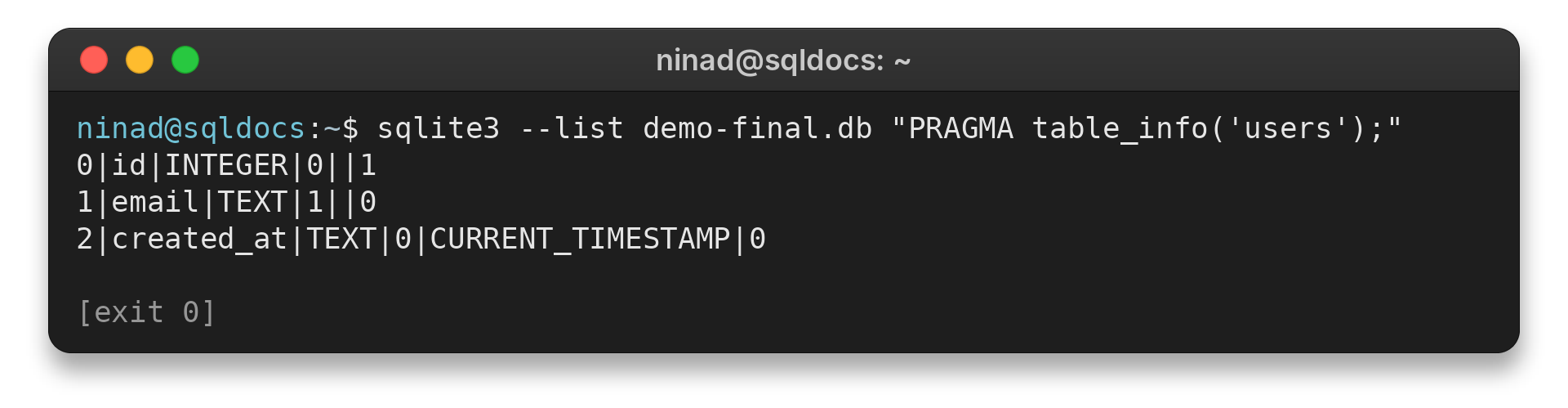
The columns appear in the order cid, name, type, notnull, dflt_value and pk. The blank dflt_value field after notnull means no default is declared. SQLite’s official table_info reference cautions that cid represents rank in this result.
The captured output uses sqlite3 list mode, which separates result fields with vertical bars. Adjacent bars mark an empty value. A blank dflt_value field therefore differs from a zero in notnull or pk.
Step 2: Filter column metadata with SELECT
The table-valued form is named pragma_table_info. Use the direct PRAGMA for a one-off inspection, then use this function when a SELECT needs to filter fields or join metadata to other tables.
SELECT name, type, "notnull"
FROM pragma_table_info('users')
WHERE pk = 0;
Because the query filters out the primary key, its output contains the other two ordinary columns:
email|TEXT|1
created_at|TEXT|0
The query returns ordinary columns and leaves out the primary key. Double quotes around notnull avoid treating the field name as a keyword. The function takes the table name as text, so the quoted argument avoids the “no such column” confusion seen in a SQLite forum discussion about this function.
The table name and result field use different quoting because they play different roles: ‘users’ is a string value passed to the function. Double quotes around notnull mark a result-column name in the SELECT list. Pass the table name as text, then compare the returned name with the column you need.
Use EXISTS when the caller needs one yes-or-no answer. It returns integer 1 for a matching metadata row and 0 when none does. That check reads column names rather than application records, and a regular SELECT retrieves the metadata row when its type or constraint values matter.
Run the check on the same connection and schema that the later query will use. An attached database can contain a table with the same name as one in main, so pass the schema explicitly when the distinction matters.
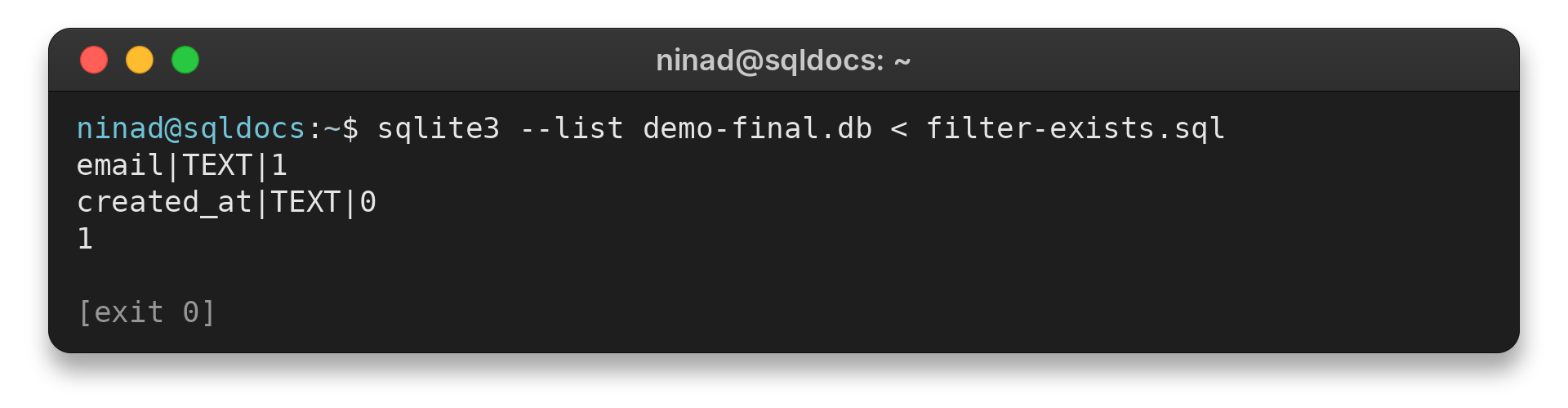
To test for one exact column name, use EXISTS around the same metadata query:
SELECT EXISTS (SELECT 1 FROM pragma_table_info('users') WHERE name = 'email');
1
A result of 1 means the column exists, while 0 means no row matched. Change the name string to test a different column.
Step 3: Inspect columns across a schema
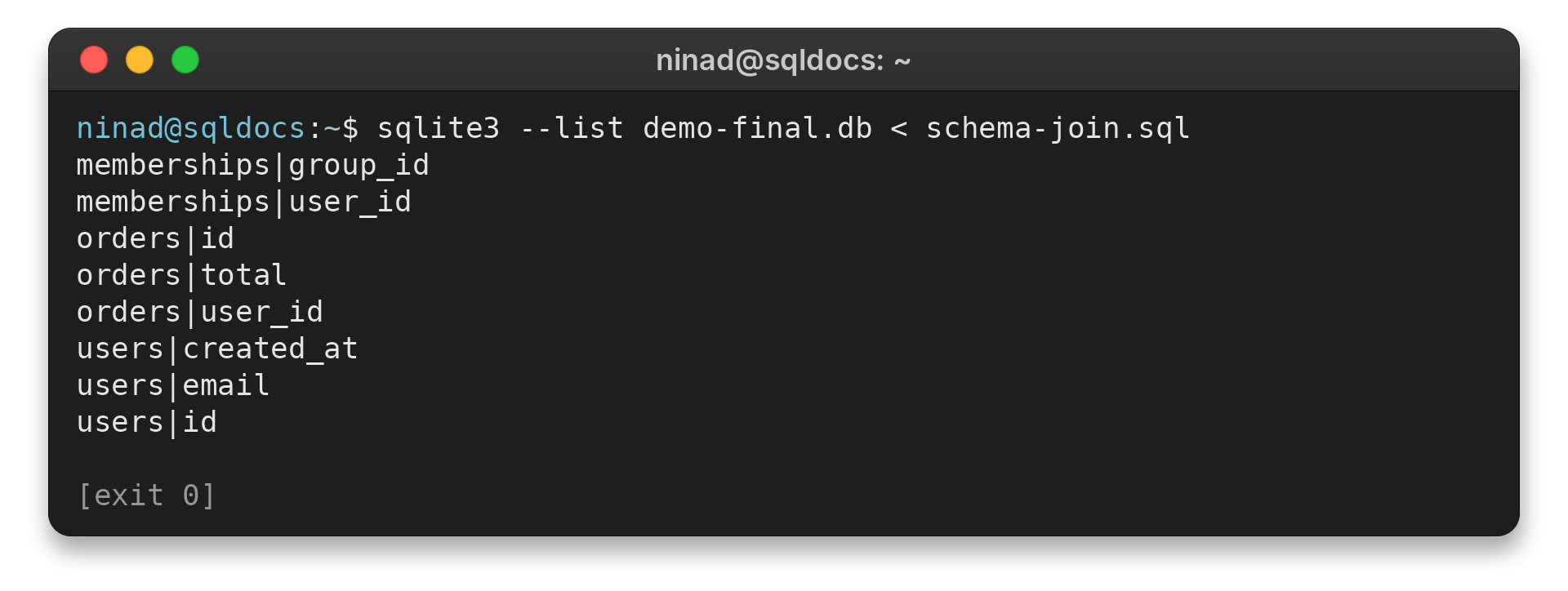
Join pragma_table_info to sqlite_schema to list columns for every table in the main database.
SELECT m.name AS table_name, p.name AS column_name
FROM sqlite_schema AS m
JOIN pragma_table_info(m.name) AS p
WHERE m.type = 'table'
ORDER BY 1, 2;
The function receives each table name from sqlite_schema. The type filter excludes views, and the final sort groups columns under each table.
memberships|group_id
memberships|user_id
orders|id
orders|total
orders|user_id
users|created_at
users|email
users|id
Here sqlite_schema supplies the main database’s tables, and ORDER BY 1, 2 sorts first by table name, then by column name.
sqlite_schema stores entries for schema objects, including tables and views. The type filter keeps this query focused on tables. To list view columns instead, use view names with pragma_table_info or change the type condition to view.
The join returns table names and column names side by side, letting one SELECT scan a database instead of running a separate command for every table. ORDER BY makes the displayed grouping reproducible. Keep the sqlite_schema source and the function’s schema argument pointed at the same database.
For an attached database, query its own schema table and pass the same schema name to the function. For example, aux.sqlite_schema paired with ‘aux’ keeps the object list and column metadata in that database. The returned rows then identify the table and the column together.
PRAGMA table_info edge cases
Use table_xinfo when the schema includes generated or hidden columns. table_info omits those columns, so its result may not describe every column exposed by a table.
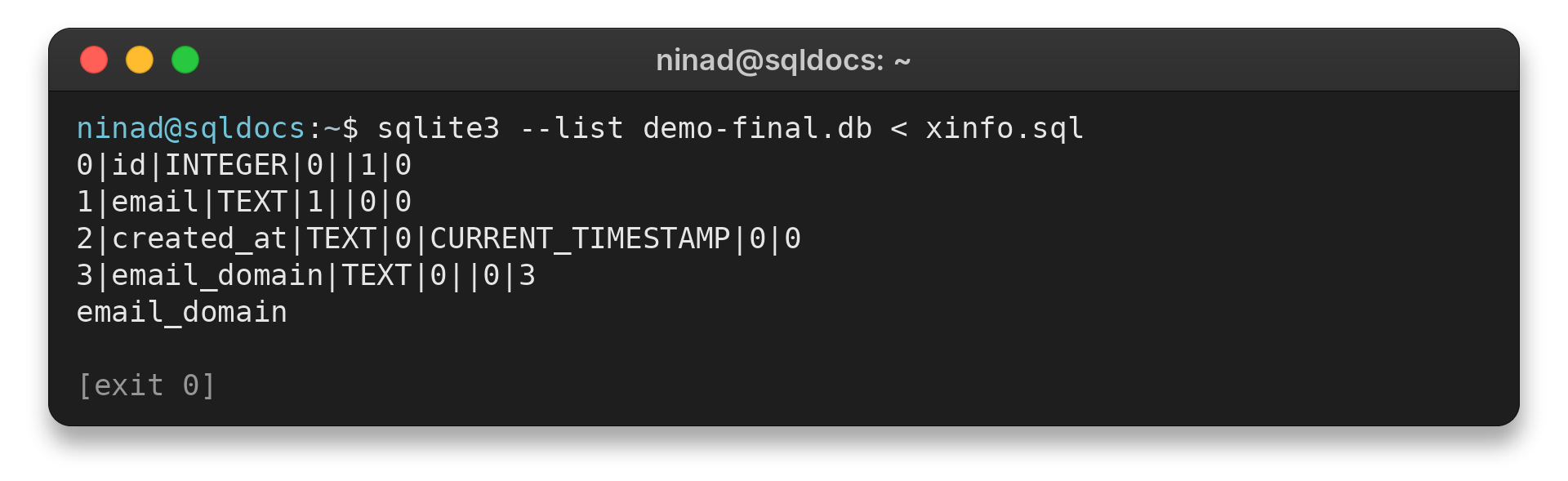
PRAGMA table_xinfo returns the same six fields plus a seventh field named hidden. SQLite uses 0 for normal columns, 2 or 3 for generated columns, and 1 for hidden virtual-table columns. This demo’s generated email_domain column is absent from table_info and appears with hidden value 3 in xinfo.
PRAGMA table_xinfo('users');
The last field marks each row’s kind. The output below includes the generated column:
0|id|INTEGER|0||1|0
1|email|TEXT|1||0|0
2|created_at|TEXT|0|CURRENT_TIMESTAMP|0|0
3|email_domain|TEXT|0||0|3
The added hidden field distinguishes ordinary columns from special ones. A value of 0 marks a normal column, 2 marks a virtual generated column, and 3 marks a stored generated column. This example uses STORED, so email_domain has value 3.
| Case | What the result shows | Next step |
|---|---|---|
| Generated or hidden column | It is absent from table_info. | Use table_xinfo to include it. |
| INTEGER PRIMARY KEY | notnull may be 0 while pk is 1. | Read pk to identify key membership. |
| Unknown table or schema | The result has no rows. | Check the table name and schema. |
| Virtual generated column | table_xinfo shows hidden value 2. | Use hidden to distinguish it from ordinary columns. |
| SQLite older than 3.16.0 | The table-valued function form is unavailable. | Use the direct PRAGMA command. |
An attached database is a separate schema on the same connection. The sample has a users table in aux as well as main.
Name the schema before table_info in the PRAGMA form, or pass it as the function’s second argument. Omit it to read main or use temp for a temporary table on the same connection.
The function’s schema argument also lets a SELECT inspect an attached database without switching connections. Table-valued PRAGMA functions require SQLite 3.16.0 or later.
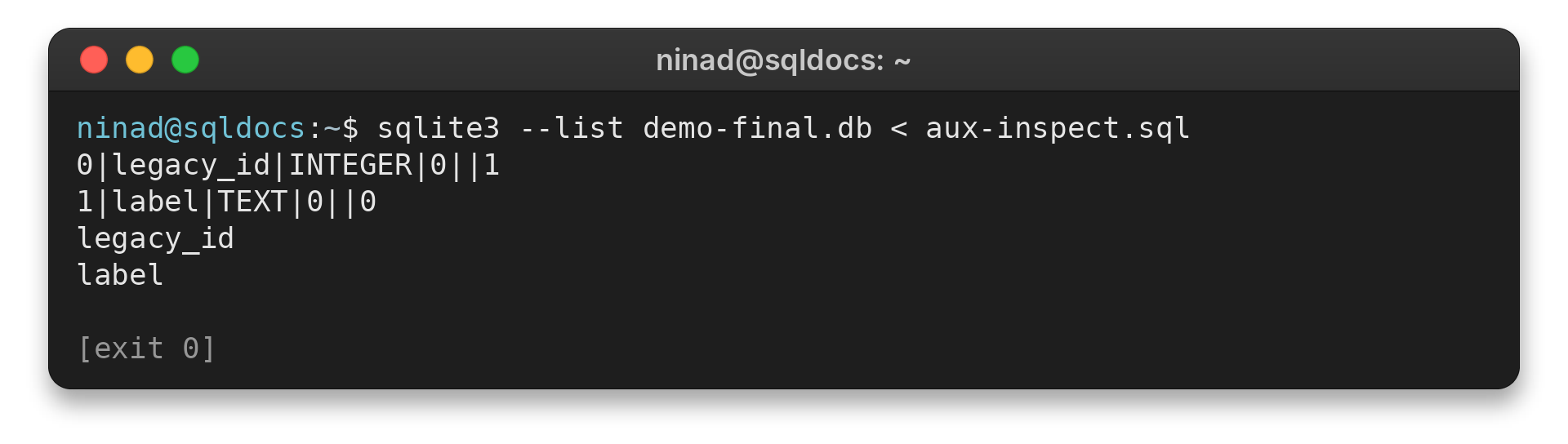
Create an attached in-memory database and its users table for this example:
ATTACH ':memory:' AS aux;
CREATE TABLE aux.users (legacy_id INTEGER PRIMARY KEY, label TEXT);
PRAGMA aux.table_info('users');
The PRAGMA lists two columns for the table in the attached aux schema:
0|legacy_id|INTEGER|0||1
1|label|TEXT|0||0
The table-valued form takes the schema as its second argument:
SELECT name FROM pragma_table_info('users', 'aux');
legacy_id
label
If a query only needs to find generated or hidden columns, filter xinfo’s added field:
SELECT name
FROM pragma_table_xinfo('users')
WHERE hidden <> 0;
email_domain
Treat the output as a snapshot of the current database connection. It does not preserve earlier table definitions, so a migration check must compare the result with stored migration history. Introspection helps diagnose the live schema but does not replace a schema-change record.
Conclusion: Choose table_info or table_xinfo
PRAGMA table_info gives a compact description of ordinary columns and their declared metadata. Use its table-valued form for filtering and joins, and switch to table_xinfo when generated or hidden columns matter.
| Choose | When to use it |
|---|---|
| table_info | You need the six metadata fields for ordinary columns. |
| table_xinfo | You also need generated or hidden columns. |
FAQ
A view’s column list and generated fields are two details worth checking.
Can PRAGMA table_info inspect a view?
Yes. It returns one row for each column selected by the view query.
How do I check whether a column exists in SQLite?
Query the table-valued form with a WHERE condition on the name field, then check whether any row is returned.
When should I use table_xinfo instead?
Use PRAGMA table_xinfo when generated or hidden columns must appear in the result.
Why is dflt_value blank?
A blank field means the column has no declared default. SQLite shows the default expression in this field when one exists.
What does cid identify?
cid is the column’s rank in the current result, starting at zero. Use name to refer to the column in application code.