
When a query needs one field from JSON stored in SQLite, the path tells SQLite which value to select. json_extract() reads a value from JSON using that path and returns it as an SQL value or JSON text, depending on what it selects.
This article shows how to write paths for nested fields and array items, then choose between json_extract(), -> and ->> for the result you need.
TL;DR: Extract a JSON Value with json_extract()
Use json_extract(json, ‘$.path’) to read a value from JSON text. A single path returns a SQL scalar for a primitive value or JSON text for an object or array.
- Use $.user.name for a nested object field and $.tags[1] for the second array item.
- Use -> when the result should remain JSON, and ->> for an SQL value.
- A missing path and a JSON null both produce SQL NULL from a single-path extraction.
What Is SQLite json_extract()?
json_extract() is a SQLite function that selects values from JSON using a path. SQLite stores JSON as ordinary text or, in newer SQLite versions, its private JSONB format, rather than as a separate JSON column type.
JSON functions are built into SQLite by default from version 3.38.0. Earlier builds may require JSON1 support at compile time.
A path starts at $, the root. It follows object labels with dots and array items with zero-based brackets. The official SQLite JSON guide covers the broader set of JSON tasks.
The first argument can be any JSON value. If a column holds JSON text, pass the column name in place of a literal string. SQLite has no separate JSON storage class, so typeof() shows the SQL result type.
A path begins at the root object, then names the user member and its name member. For an array, the index in brackets selects an item. Add a dot or bracket to continue into a nested value.
| Selected JSON value | Single-path json_extract() result |
|---|---|
| String | SQL TEXT without JSON quotation marks |
| Integer or decimal number | SQL INTEGER or floating-point |
| Boolean | SQL integer 0 or 1 |
| JSON null | SQL NULL |
| Object or array | JSON-formatted SQL TEXT |
This type mapping is the key difference between SQLite and systems where extraction always returns JSON. It also explains why a string path can be compared directly as SQL text while a selected object remains encoded JSON.
MySQL’s json_extract() always returns JSON. SQLite returns SQL TEXT for a string selected by one path, without the JSON quotes. That difference can affect a comparison after a database migration, so check which result form the application expects.
How to Extract Values with JSON Paths
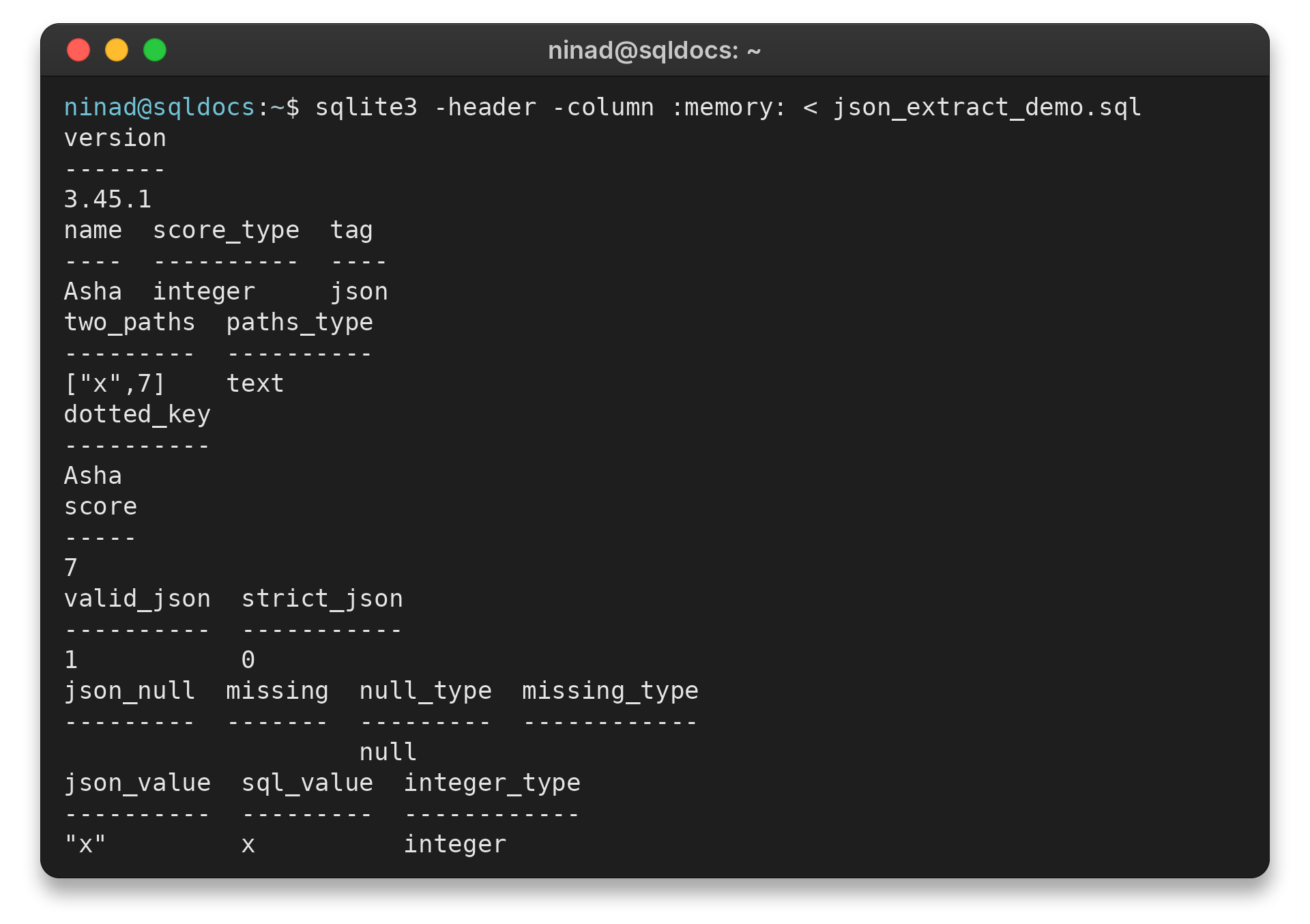
Pass the JSON value first and the path second. I ran the examples below with SQLite 3.45.1. They check nested fields and array indexes.
Separate queries show how multiple paths are returned. The final examples focus on result types and NULL cases.
Step 1: Read a Nested Field or Array Item
The path $.user.name follows two object labels. The path $.tags[1] selects the second array element because SQLite indexes arrays from zero.
SELECT json_extract('{"user":{"name":"Asha","score":7},"tags":["sql","json"]}', '$.user.name') AS name,
       typeof(json_extract('{"user":{"name":"Asha","score":7},"tags":["sql","json"]}', '$.user.score')) AS score_type,
       json_extract('{"user":{"name":"Asha","score":7},"tags":["sql","json"]}', '$.tags[1]') AS tag;
The command returned:
name  score_type  tag
Asha  integer     json
The numeric field has SQLite type integer, while the selected array item is returned as the SQL text json.
When an object key contains a dot, quote the key inside the path so SQLite does not treat the dot as another path separator. The same rule applies when the key is not a simple label. I ran a query for a dotted key:
SELECT json_extract('{"profile":{"display.name":"Asha"}}', '$.profile."display.name"') AS dotted_key;
The result was:
dotted_key
Asha
The quotes are part of the path syntax, not the key name. Array positions still use brackets, and a negative-from-the-end index can be written as [#-1] for the last item.
Step 2: Select More Than One Path
Separate paths produce one JSON array containing the selected values. That differs from selecting a single path to an object or array, which returns that JSON structure as text.
SELECT json_extract('{"a":"x","b":7}', '$.a', '$.b') AS two_paths,
       typeof(json_extract('{"a":"x","b":7}', '$.a', '$.b')) AS paths_type;
SQLite returned [“x”,7] with storage type text. This array is encoded as JSON text rather than a distinct SQL type. Each selected value occupies the position corresponding to its path argument.
Multiple path arguments are different from one path that points to an existing JSON array. The first form assembles the selected results into a new array in path order. The second returns the array already stored at that location.
You can also use an extracted number in a condition. SQLite keeps a numeric JSON value numeric for a single-path result, so the comparison below selects the row when the extracted score is greater than five.
SELECT json_extract('{"score":7}', '$.score') AS score WHERE json_extract('{"score":7}', '$.score') > 5;
It returned:
score
7
For stored rows, replace the JSON literal with the JSON column and add a FROM clause. This keeps the path the same while applying the test to each row.
Step 3: Choose Between json_extract(), -> and ->>
For a single path, json_extract() behaves like ->> for primitive values and like -> for objects or arrays. The operators make the desired result form explicit.
| Expression | Result form | Use it for |
|---|---|---|
| json_extract(doc, path) | SQL scalar for a primitive, JSON text for object or array | One function covering both forms |
| doc -> path | JSON representation, including quotes around strings | Passing a selected JSON fragment onward |
| doc ->> path | SQL TEXT, INTEGER, floating-point number or NULL | Comparisons and display of scalar values |
In the SQLite documentation, -> always returns JSON text, while ->> returns a native SQL scalar. This difference matters when a string result includes JSON quotation marks or a number needs numeric comparison. See the SQLite built-in functions reference for other SQL functions.
Common Errors and Return Types
Use json_type() when SQL NULL alone does not tell you whether the path was missing or held JSON null. Both cases return SQL NULL from single-path json_extract(), but the type check distinguishes them.
SELECT json_extract('{"a":null}', '$.a') AS json_null,
       json_extract('{}', '$.a') AS missing,
       json_type('{"a":null}', '$.a') AS null_type,
       json_type('{}', '$.a') AS missing_type;
The first two columns are both SQL NULL. json_type() returns the text null for a present JSON null and SQL NULL when the path does not exist.
A malformed JSON document or malformed path raises an error rather than returning a useful value. Validate untrusted JSON with json_valid() before extracting it. A path must begin with one $, followed by object labels or array indexes.
The same check returned 1 for strict JSON and 0 for a JSON5-style unquoted key on SQLite 3.45.1. SQLite can read JSON5 input from version 3.42.0, but the one-argument json_valid() test continues to check strict JSON. If your application accepts JSON5, use the documented flags form of json_valid() and state that policy explicitly.
SQLite JSONB is a binary parse representation accepted by JSON functions, but it is an opaque SQLite-specific format. Treat it as a BLOB managed by SQLite rather than decoding it in application code. For extraction, the function and path rules are otherwise the same as for text JSON.
Validate a JSONB value that did not come from SQLite with json_valid(). A malformed JSONB input can produce an error or an incorrect result. SQLite documents that it will not cause a memory error, but it still must be treated as untrusted data.
SQLite reads JSON5 input from version 3.42.0, but JSON-producing functions emit canonical JSON text. The one-argument json_valid() call checks strict JSON, so it can return zero for JSON5 text that other JSON functions accept. Use the documented validation flags when JSON5 is part of the input contract.
SQLite JSONB is not binary-compatible with PostgreSQL JSONB. SQLite’s documentation describes lookups as O(N) for many operations, so do not assume object lookup is constant-time. Its documented gains are less parsing work and often smaller storage.
Invalid JSON and malformed paths are different problems. json_valid() checks whether input is valid JSON, while the path must still follow SQLite’s grammar, beginning with one dollar sign and continuing with object labels or array indexes. Check both inputs when they come from users.
| Case | Observed result | What to check |
|---|---|---|
| Path does not exist | SQL NULL | Use json_type() to check the path |
| Path contains JSON null | SQL NULL from json_extract() | json_type() returns text null |
| Malformed JSON or path | Statement error | Validate JSON and use a well-formed path |
| JSON array result | JSON text | Use json_each() when each item needs its own row |
Conclusion: Match the Operator to the Result
Build a path from $ to the field or array index, then choose the result form you need. Use json_extract() for its mixed scalar-and-JSON behavior, -> for JSON text, and ->> for an SQL scalar.
For one row per array element, use SQLite’s json_each() instead of extracting a single index. The JSON functions and operators are documented in the SQLite JSON reference.
FAQ
These answers cover common extraction choices.
How do I get a value from a JSON object in SQLite?
Call json_extract(column, ‘$.key’) for an object field. Use dot labels for nested objects and brackets for array indexes.
What does SQLite json_extract() return for a missing path?
It returns SQL NULL. A JSON null value also returns SQL NULL, so use json_type() to distinguish a present JSON null from a missing path.
What is the difference between -> and ->> in SQLite?
The -> operator returns a JSON representation. The ->> operator returns an SQL scalar such as TEXT, INTEGER, REAL, or NULL.