
A query may need to transform a value or calculate a result across rows. SQLite functions take arguments in a SQL expression and return a value or compute a result across rows.
I’ll explain how to identify a function by its family and check whether it is available in your SQLite build.
TL;DR
Choose a scalar function for one value, an aggregate for a group of rows, or a window function when each row must stay in the result. Date/time, JSON and math functions have their own details in the SQLite documentation. I group the catalog by result shape because that tells you what the query returns.
- Scalar: abs(), lower(), coalesce()
- Aggregate: count(), sum(), avg()
- Window: row_number() OVER (…)
- Date/time: date(), datetime(), strftime()
- JSON: json_extract(), json_valid()
- Math: round(), abs(), sqrt() when enabled
What Is a SQLite Function?
A SQLite function takes arguments inside a SQL expression and returns a value or computes a result across rows. A scalar function runs for each input row, while an aggregate such as sum() combines values in a group. I separate these types before listing families because their result shapes differ.
A window function uses an OVER clause to calculate across related rows without reducing them to one row. Date/time, math and JSON functions are additional families. The official core scalar function reference lists built-ins, while the other families have separate catalogs.
SQLite Functions by Category
I ran these queries against one in-memory database to compare common function results with SQLite’s documented behavior.
Run examples for the main function families
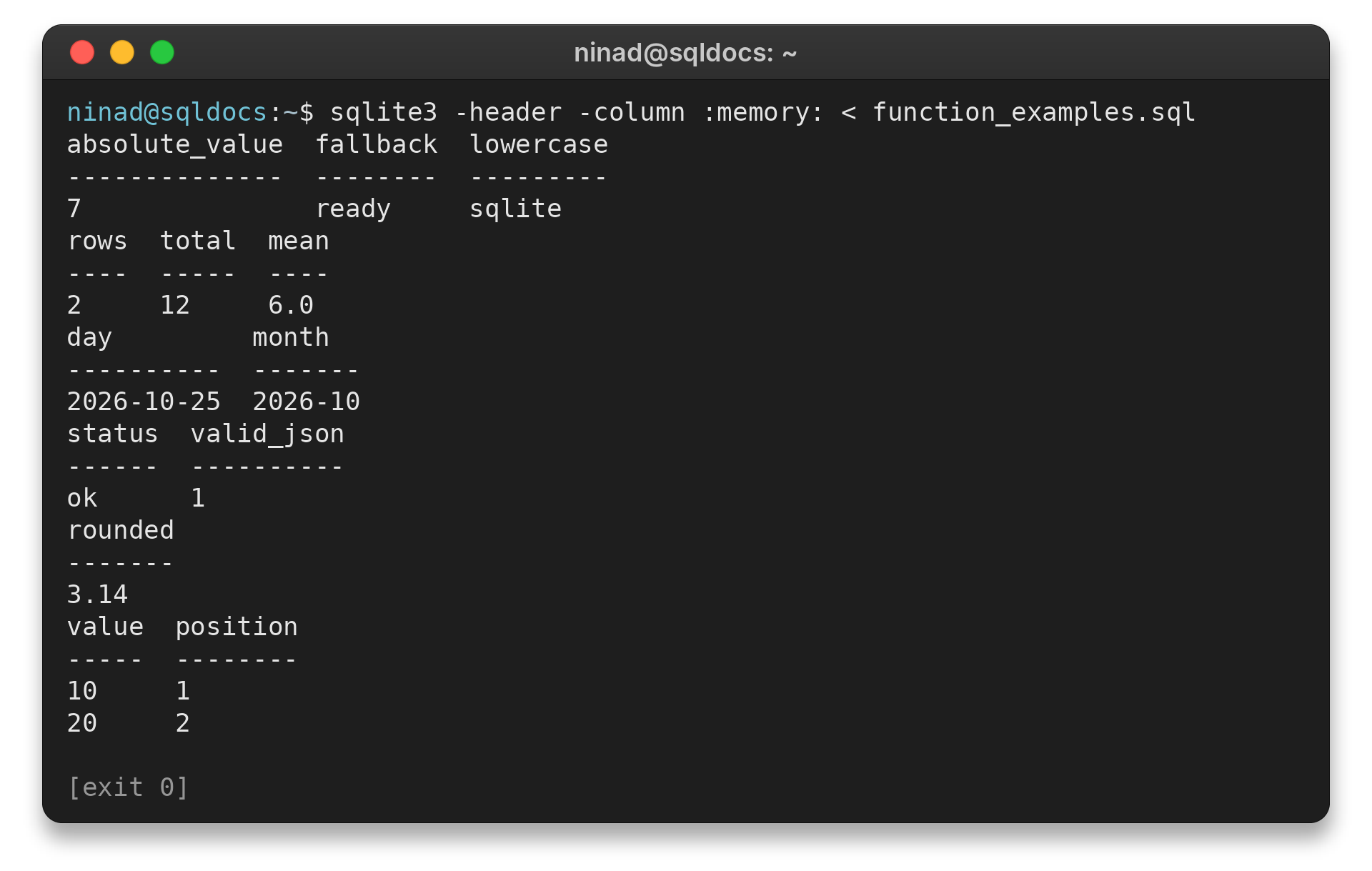
Save this as function_examples.sql and run the shell command shown below. SQLite 3.38.0 or newer includes JSON functions by default, while availability can still depend on compile options for other families.
sqlite3 -header -column :memory: < function_examples.sql
The captured terminal output below comes from that exact SQL file. The window shows the selected function results and a successful exit status.
SELECT abs(-7) AS absolute_value,
       coalesce(NULL, 'ready') AS fallback,
       lower('SQLite') AS lowercase;

SELECT count(*) AS rows,
       sum(value) AS total,
       avg(value) AS mean
FROM (SELECT 4 AS value UNION ALL SELECT 8);

SELECT date('2026-10-25') AS day,
       strftime('%Y-%m', '2026-10-25') AS month;

SELECT json_extract('{"status":"ok"}', '$.status') AS status,
       json_valid('{"status":"ok"}') AS valid_json;

SELECT round(3.14159, 2) AS rounded;

SELECT value,
       row_number() OVER (ORDER BY value) AS position
FROM (SELECT 20 AS value UNION ALL SELECT 10)
ORDER BY value;
absolute_value  fallback  lowercase
--------------  --------  ---------
7               ready     sqlite
rows  total  mean
----  -----  ----
2     12     6.0
day         month
----------  -------
2026-10-25  2026-10
status  valid_json
------  ----------
ok      1
rounded
-------
3.14
value  position
-----  --------
10     1
20     2
The scalar query applies each function to one row. count(*) counts rows, while count(column) ignores NULL values. The other aggregates work on non-NULL inputs, and adding OVER to row_number() gives each result row a position without collapsing the rows.
| Family | Functions to know | Example use |
|---|---|---|
| Scalar | abs, lower, coalesce, substr, length | Transform a value or replace NULL |
| Aggregate | count, sum, avg, min, max, group_concat | Summarize a result set or group |
| Window | row_number, rank, lag, lead | Rank or compare rows while keeping them |
| Date/time | date, time, datetime, julianday, unixepoch, strftime, timediff | Parse and format supported time-values |
| JSON | json, json_array, json_extract, json_object, json_valid | Read, build or validate JSON |
| Math | ceil, floor, log, mod, pow, sqrt | Numeric operations when built in |
Use coalesce() when a query should return the first non-NULL argument. ifnull() is its two-argument form, while nullif(X,Y) returns NULL when the arguments match. iif() selects a value based on a true or false condition.
For text, lower(), upper(), length(), replace() and substr() handle common transformations. The core function catalog documents the full scalar list and each function’s argument rules.
SQLite’s abs() also has a boundary case: the minimum signed 64-bit integer has no positive counterpart in that integer range, so abs() raises an integer overflow error for that exact input. The core reference documents this behavior and the conversions used by numeric functions.
count(*) includes every row in the group, while count(X) counts only rows where X is not NULL. sum() returns NULL when there are no non-NULL inputs, so total() can be a better fit when an empty input should produce zero.
group_concat() joins non-NULL values. Put an ORDER BY inside the aggregate call when the concatenated order matters, because the default input order is not guaranteed.
SQLite stores date/time values as text, Julian day numbers or Unix timestamps instead of a dedicated date type. date(), time() and datetime() return formatted text. julianday() and unixepoch() return numbers, which makes them useful when an expression needs a numeric time value instead of a formatted string.
Math functions such as sqrt(), floor() and log() depend on the SQLITE_ENABLE_MATH_FUNCTIONS build option. I link to the official math function catalog rather than assume each build includes them.
For date formatting, SQLite strftime examples cover format strings. The date/time family accepts ISO-8601 text and Julian day numbers. Unix timestamps need the unixepoch modifier in functions that accept modifiers.
SQLite applications can register custom scalar, aggregate and window functions through its function API. Each registration belongs to one database connection, so another connection needs its own registration.
The application-defined function guide describes registration and callbacks. I keep these separate from built-ins because a custom function belongs to the embedding application.
JSON functions include table-valued calls such as json_each() and json_tree(), which expose elements as rows. JSON paths start with $ and select object labels or array indexes. A malformed path can raise an error, so check the path syntax when a query fails.
SQLite stores JSON as ordinary SQL text rather than a separate JSON storage type. JSON5 input support arrived in SQLite 3.42.0, and SQLite’s JSONB format arrived in 3.45.0. Treat JSONB as an SQLite-specific opaque value rather than assuming it matches another database’s binary JSON format.
A window function can use PARTITION BY to restart its calculation for each group. Its ORDER BY sets the sequence inside each group, while the query’s outer ORDER BY determines the rows’ display order. This makes window functions useful for ranking or comparing rows without grouping the result into fewer rows.
Read the SQLite JSON reference before relying on less common JSON behavior. The local guide to concatenating SQLite strings covers ||, concat() and concat_ws().
For the full set of aggregate calls and ordering rules, use SQLite’s aggregate function documentation. Window functions are documented separately, and the SQLite extensions guide explains how add-on functions differ from built-ins.
SQLite Function Availability and Common Pitfalls
A function’s presence depends on the SQLite library and, for some functions, its compile options or loaded extensions. Check the library used by your application, not only the sqlite3 command-line program installed separately.
| Case | What to check | Next step |
|---|---|---|
| No such function error | Runtime library version and enabled features | Check sqlite_version() and the host application’s build |
| Math call is missing | Math functions can depend on SQLITE_ENABLE_MATH_FUNCTIONS | Use a build with the option enabled or calculate in the host language |
| Custom function is missing | Application-defined calls are registered by the host process | Register it with that connection or load a supported extension |
| Aggregate output order changes | Concatenating aggregates need an explicit input order | Use ORDER BY inside the aggregate invocation when supported |
The application-defined function guide covers registration details. SQLite creates each function on a database connection, so another connection does not inherit it.
The sqlite_version() function identifies the library version. A runtime may bundle a different SQLite build than the system CLI, and math functions can be disabled at compile time. I check the SQLite SELECT guide for query structure because function calls are expressions inside a larger statement.
Conclusion: Choose the Function by Its Job
Start with the result shape: scalar functions transform values, aggregates summarize rows, and window functions keep rows while calculating across them. Then check the official family reference for exact arguments and build requirements.
For database setup and query syntax, continue with the SQLite extensions guide or the SELECT statement reference.
FAQ
These answers cover common function lookup questions.
Does SQLite support functions?
Yes. SQLite includes built-in scalar, aggregate, date/time, window and JSON functions. Applications can also register functions.
How do I check the SQLite version?
Run SELECT sqlite_version(); against the same SQLite connection your application uses.
Can I create a custom SQLite function?
Yes. The host application registers an application-defined function for its SQLite connection using the SQLite API or its language binding.