
In a query, a date or time value may need a different display format. SQLite’s strftime() turns a supported date or time value into text, with percent codes controlling which parts appear and in what order.
In this piece, I’ll show you how to choose those codes and use strftime() to format a value or return one field.
TL;DR
SQLite strftime(format, time-value) returns the date or time as text, with percent codes controlling the output.
SELECT strftime('%Y-%m-%d', '2024-03-09 16:05:07');
SELECT strftime('%d/%m/%Y', '2024-03-09 16:05:07');
SELECT strftime('%Y', '2024-03-09 16:05:07');
2024-03-09
09/03/2024
2024
The first query keeps ISO date order, while the second reorders it for display and the third returns only the year.
What is SQLite strftime()?
strftime() reads a supported SQLite time value and applies each percent substitution in its format string. SQLite accepts common date/time text, Julian day numbers, and Unix timestamps with the appropriate modifier, and strftime() returns a formatted string.
I use strftime() for display here because the function returns text, not a numeric value.
The format string sets which fields appear and in what order. With %Y-%m-%d, the result follows ISO date order. Moving the day code first and using slashes gives %d/%m/%Y.
How to format and extract dates with strftime()
Choose the codes for the output you need, then pass a SQLite-recognized time value after the format. I use a fixed timestamp in these examples so the result stays the same each time you run them.
Step 1: Pick the format codes
The commonly used codes below cover calendar dates, clock time, and week fields. The official SQLite reference lists additional codes and marks the version where its current list applies.
| Code | Output | Example |
|---|---|---|
| %Y | Four-digit year | 2024 |
| %m | Month, 01-12 | 03 |
| %d | Day of month, 01-31 | 09 |
| %H | Hour, 00-24 | 16 |
| %M | Minute, 00-59 | 05 |
| %S | Second, 00-59 | 07 |
| %f | Fractional seconds | 07.000 |
| %j | Day of year, 001-366 | 069 |
| %w | Weekday, Sunday=0 | 6 |
| %G, %V, %u | ISO week year, week, weekday | See version note |
| %% | Literal percent sign | % |
%m and %d include leading zeroes. Use %e for a day without a leading zero, and %I with %p for a 12-hour clock. The full list also includes %F, %R, %T, %s, %J, %U, %W, %k, %l, %g and %P.
Step 2: Format or extract the value
Combine codes in one string to format a date, or use a single code to extract a part. These exact queries ran with SQLite 3.45.1 and returned the output shown.
SELECT strftime('%d/%m/%Y', '2024-03-09 16:05:07');
SELECT strftime('%Y-%m-%d', '2024-03-09 16:05:07');
SELECT strftime('%Y', '2024-03-09 16:05:07');
SELECT strftime('%H:%M:%S', '2024-03-09 16:05:07');
09/03/2024
2024-03-09
2024
16:05:07
Use the first format for a day/month/year display and the second for the ISO date. The time query returns a 24-hour clock string.
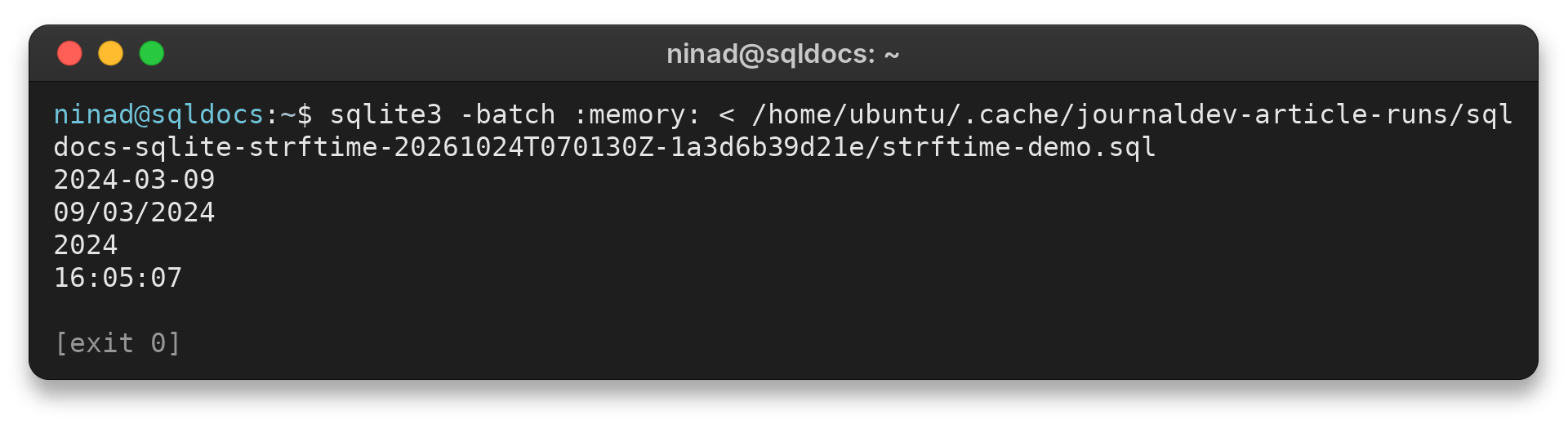
The terminal output matches the four query results above, including the year and time fields.
Step 3: Format values from a column
Pass the column name as the time-value to format stored rows. I use a TEXT column with an ISO-style value here because SQLite date functions can parse that documented shape directly.
CREATE TABLE events(event_date TEXT);
INSERT INTO events VALUES ('2024-03-09 16:05:07');
SELECT event_date, strftime('%Y', event_date) AS year, strftime('%d/%m/%Y', event_date) AS display_date FROM events;
SELECT strftime('%J', '2024-03-09 16:05:07');
event_date           year  display_date
-------------------  ----  ------------
2024-03-09 16:05:07  2024  09/03/2024

strftime('%J', '2024-03-09 16:05:07')
-------------------------------------
2460379.170219908
The first result formats a table value in two ways. %J returns a Julian day number as text for display. Use julianday() when calculations need a numeric result.
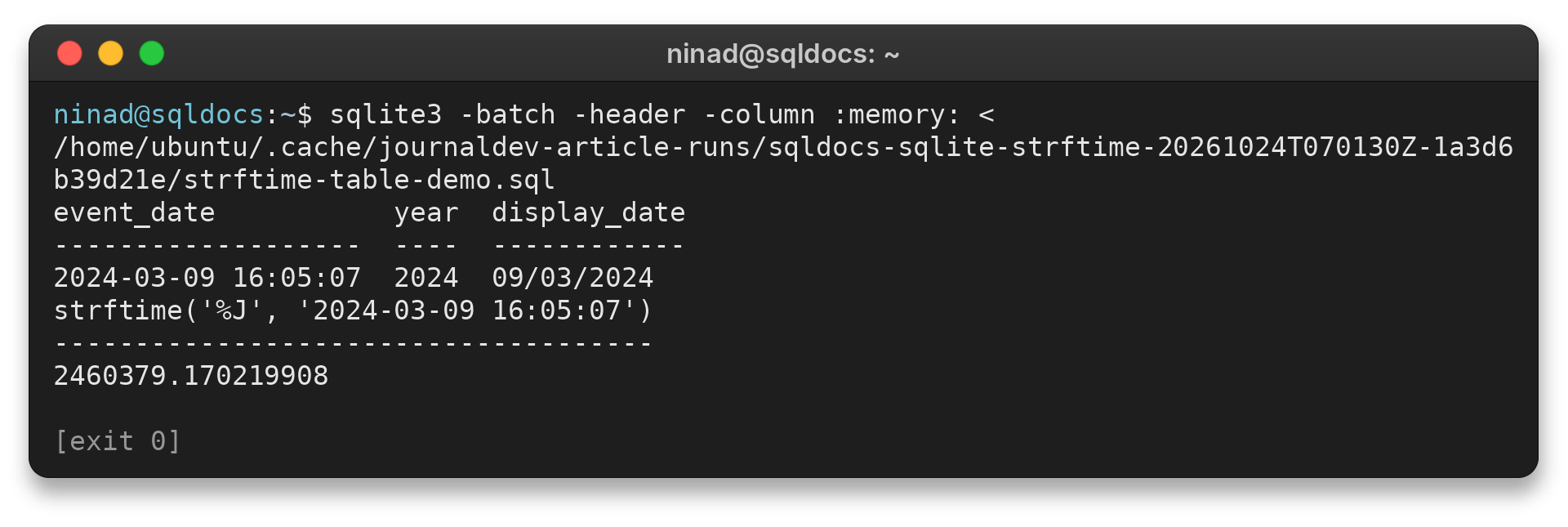
I keep %J as a reference example rather than a calculation path because SQLite documents julianday() as the numeric alternative.
SQLite strftime() format-code limits
Unsupported substitutions and unrecognized input can produce NULL, so check the SQLite version and the shape of stored dates when a result is blank. I kept the example codes to those available in the server’s SQLite 3.45.1, then call out the newer ISO week codes separately.
| Case | What you may see | What to check |
|---|---|---|
| Input like 09/03/2024 | NULL | Use a supported date/time format such as 2024-03-09, or rearrange the stored text before calling strftime(). |
| A code unsupported by the installed SQLite | NULL | Check sqlite_version() and the date/time documentation for that release. |
| Need a number for arithmetic | Text output | Cast the extracted numeric part, or use unixepoch() or julianday() for numeric time values. |
SQLite’s current documentation lists %G, %g, %u and %V among its substitutions as of version 3.46.0. They are unsupported in the 3.45.1 runtime used for the demonstrations, so verify the target runtime before relying on them.
For an existing non-ISO string, strftime() does not parse arbitrary display formats. Rearrange its components or store a supported time value first.
Conclusion: match each format code to its output
Build the format from the parts you need, and keep the input in a format SQLite can read. For the broader date/time function set, see the SQLite date and time guide and SQLite date functions guide. The official SQLite date and time reference has the complete substitution list.
FAQ
These answers cover two common formatting questions.
How do I format a date as DD/MM/YYYY in SQLite?
Use strftime(‘%d/%m/%Y’, date_value). For example, strftime(‘%d/%m/%Y’, ‘2024-03-09’) returns 09/03/2024.
Why does SQLite strftime() return NULL?
The input may not be a supported SQLite time value, or the installed SQLite version may not recognize one of the format substitutions.