
When a database call fails, its error message gives you text, while the SQLite result code identifies the outcome of the operation. SQLite result codes are integer values that describe operation outcomes, and extended codes add a more specific cause.
In this piece, I’ll show how to capture the code and message, then match the result to SQLite’s documented meaning.
TL;DR
SQLite result codes are integer values returned by database operations. The lowest eight bits identify a primary code, while higher bits can identify a more specific extended code.
- Use the primary code to identify the broad result category.
- Check the extended code for a specific cause, such as a UNIQUE constraint failure.
- Read the error message for context, but do not treat it as a substitute for the code.
For the complete list, see SQLite’s Result and Error Codes reference. The table below covers the codes that commonly guide application debugging.
What Are SQLite Result Codes?
A result code is an integer that an SQLite interface returns to describe the outcome of an operation. SQLITE_OK means success, while SQLITE_ROW and SQLITE_DONE mark rows and completion in multi-step operations. Other values generally indicate errors.
The numeric values describe a SQLite result, not a general operating-system exit status. A driver or language wrapper may convert them into exceptions or return values. Check that wrapper’s API docs when the interface does not expose the numeric code directly.
SQLITE_ROW marks a row ready for reading. SQLITE_DONE marks completion, while SQLITE_OK marks success.
| Result | Value | Meaning in a call |
|---|---|---|
| SQLITE_OK | 0 | The operation succeeded. |
| SQLITE_ROW | 100 | A row is available to the application. |
| SQLITE_DONE | 101 | The operation has completed. |
This distinction matters when reading C code because a nonzero result is not always an error. A loop that reads rows usually continues on SQLITE_ROW and stops on SQLITE_DONE. An application that treats every value other than SQLITE_OK as a failure can mis-handle normal query results.
Primary and Extended SQLite Error Codes
The lowest eight bits of an SQLite result code hold its primary code. An extended result code preserves that primary value and adds detail, so an application can group related failures or handle a specific subtype.
For example, SQLITE_CONSTRAINT_UNIQUE is an extended form of SQLITE_CONSTRAINT. Its primary value is 19 and its extended value is 2067. Masking an extended result with 0xff recovers the primary code.
extended_code = 2067
primary_code = extended_code & 0xff
print(primary_code)
19

This bit operation is useful when an API returns an extended code but your handler groups failures by their primary category. SQLite documents that the primary code is always contained in the extended code.
An application can compare the exact extended value when it needs different handling for distinct constraint failures. A shared handler can instead mask the value and branch on its primary code. That keeps one broad path for all constraint errors while preserving the subtype for logging or a targeted message.
Extended codes are useful only when the interface makes them available. In the C API, sqlite3_extended_errcode() retrieves the extended result for the latest database error even when extended result codes are not enabled for return values. Enabling extended result codes changes what interfaces return for that connection, so check the API contract for the binding you use.
Do not derive a message from a numeric code when the connection can provide the actual error text. SQLite’s sqlite3_errmsg() returns text associated with the latest connection error, while sqlite3_errstr() maps a result code to a general description when one exists. The connection-specific message can contain context that a generic description cannot.
Common SQLite Error Codes and Messages
These codes cover frequent database access, transaction, constraint, and schema failures. The message text can vary with the operation, so treat the descriptions as meanings rather than fixed message strings.
| Code | Numeric value | Meaning |
|---|---|---|
| SQLITE_BUSY | 5 | A conflicting database connection prevents the operation from proceeding. |
| SQLITE_LOCKED | 6 | A conflict exists on the same connection or in a shared cache. |
| SQLITE_READONLY | 8 | The operation tried to change data through a read-only connection. |
| SQLITE_CANTOPEN | 14 | SQLite could not open a database or related file. |
| SQLITE_SCHEMA | 17 | A prepared operation encountered a changed database schema. |
| SQLITE_CONSTRAINT | 19 | An SQL constraint prevented a change. |
| SQLITE_FULL | 13 | A write could not complete because storage was full. |
| SQLITE_IOERR | 10 | The operating system reported an input/output failure. |
| SQLITE_CONSTRAINT_UNIQUE | 2067 | A UNIQUE constraint failed. |
| SQLITE_CONSTRAINT_FOREIGNKEY | 787 | A foreign key constraint failed. |
SQLite groups related causes under a primary code. For example, SQLITE_CONSTRAINT has extended codes for UNIQUE, CHECK, FOREIGN KEY, and NOT NULL violations. Follow a focused fix guide for SQLite UNIQUE constraints or database is locked errors when you need steps for that specific failure.
For triage, begin with the primary code because it gives a stable category across the extended codes. Narrow to the subtype when the application receives it. This prevents a handler from confusing two failures that share a broad family but need different responses.
SQLITE_ERROR is a generic fallback when SQLite has no more specific code. SQLITE_MISMATCH signals a type mismatch in operations where SQLite enforces type rules, while SQLITE_RANGE means a bind parameter or column index is outside the valid range. SQLITE_MISUSE points to an unsupported or undefined use of an SQLite interface and calls for a code correction rather than a retry loop.
SQLITE_CORRUPT indicates a damaged database structure. SQLITE_NOTADB means the file opened as a database does not appear to be an SQLite database. SQLITE_FULL means a write cannot finish because the relevant storage is full, which can include temporary storage rather than only the main database volume.
SQLITE_IOERR is a broad operating-system I/O failure with extended codes for operations such as reading, writing, syncing, or truncating files. Use its extended subtype when available because it identifies which file operation failed. The official catalog defines many such subtypes and remains the better place to check rare values.
How to Read an SQLite Error Code Step by Step
Capture the code and message as soon as the database call fails. SQLite’s C API provides sqlite3_errcode() for the current result, sqlite3_extended_errcode() for the extended value, and sqlite3_errmsg() for its English-language message.
Step 1: Capture the error from your database call
Catch the exception or inspect the return value immediately after the failed operation. Error state is associated with the latest operation on a connection, so a later call may replace the information you intended to inspect.
| Capture | SQLite example | Why now |
|---|---|---|
| Code and name | 2067, SQLITE_CONSTRAINT_UNIQUE | The application can classify this failure before another connection operation changes its error state. |
| Message | UNIQUE constraint failed: users.email | The text adds the affected table and column in this example. |
Step 2: Read the code and the message
Use the application interface to retrieve a symbolic name, numeric code, or message. In C, sqlite3_extended_errcode() returns the extended code and sqlite3_errmsg() returns connection error text. In Python, inspect the exception attributes when the supported runtime documents them.
I ran the following Python example with an in-memory database. It creates a UNIQUE column, inserts the same value twice, and prints the exception’s message, numeric code, and symbolic name.
import sqlite3
import sys

print(f"Python {sys.version.split()[0]}")
print(f"SQLite {sqlite3.sqlite_version}")

try:
    with sqlite3.connect(":memory:") as connection:
        connection.execute("CREATE TABLE users (email TEXT UNIQUE)")
        connection.execute("INSERT INTO users VALUES (?)", ("dev@example.com",))
        connection.execute("INSERT INTO users VALUES (?)", ("dev@example.com",))
except sqlite3.IntegrityError as error:
    print(f"message: {error}")
    print(f"code: {error.sqlite_errorcode}")
    print(f"name: {error.sqlite_errorname}")
Python 3.14.7
SQLite 3.53.1
message: UNIQUE constraint failed: users.email
code: 2067
name: SQLITE_CONSTRAINT_UNIQUE
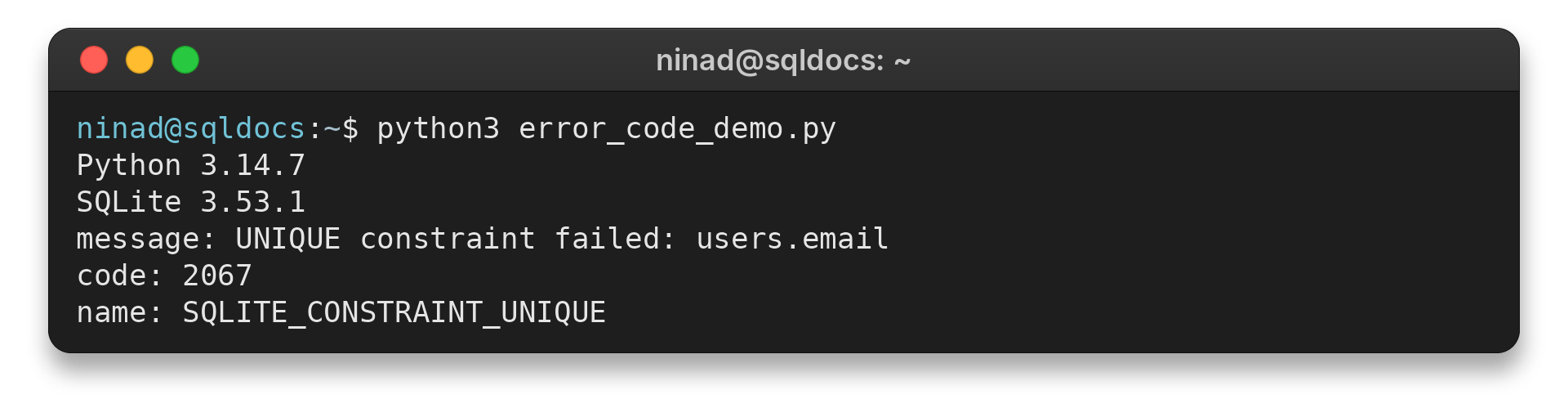
The Python sqlite3 reference documents sqlite_errorcode and sqlite_errorname on exceptions originating in SQLite, added in Python 3.11. Check the minimum Python version your application supports before using those attributes.
Step 3: Match the result to its documented meaning
Use the symbolic name to find the corresponding entry in SQLite’s result-code reference. If the code is extended, inspect both the subtype and its primary family. Then use the connection-specific error text to see which table, column, or operation was involved when SQLite includes that context.
This order avoids a common misread: the text “database is locked” is not itself a symbolic code. It can be displayed for a primary or extended locking result, and an application may shorten the details. The numeric and symbolic values from the database API are the reliable lookup keys.
For example, a code of 2067 maps to SQLITE_CONSTRAINT_UNIQUE. The primary code is 2067 & 0xff, or 19, which maps to SQLITE_CONSTRAINT. The message can add the table and column names, as the executed example shows.
| Step | Code or check | What it tells you |
|---|---|---|
| Capture | error.sqlite_errorcode | Reads the integer attached to the caught Python exception. |
| Identify subtype | 2067 | Maps to SQLITE_CONSTRAINT_UNIQUE. |
| Group by family | 2067 & 0xff | Returns primary code 19, SQLITE_CONSTRAINT. |
When an exception exposes only a primary code, use the message and the operation context to narrow the cause. Do not assume every binding exposes every extended result code in the same way. SQLite’s documentation defines the values, but the wrapper library controls how an application receives them.
SQLite Error Code Lookup: Common Confusions
Match the result code to SQLite’s reference rather than relying on the error message.
| Symptom or case | What to check | Next action |
|---|---|---|
| “database is locked” | Read the numeric and symbolic code. The message alone may hide the subtype. | Determine whether another connection, transaction, or shared cache is involved. |
| SQLITE_BUSY | Check whether another connection holds a conflicting transaction. | Use a timeout when waiting can resolve the conflict. Otherwise, review transaction flow. |
| SQLITE_LOCKED | Check same-connection use and shared-cache activity. | Finish or reset the conflicting operation before retrying. |
| SQLITE_SCHEMA | Check whether the schema changed after statement preparation. | Reprepare the statement when the interface does not handle this automatically. |
| SQLITE_CONSTRAINT | Inspect the extended code and accompanying message. | Identify the violated constraint before changing the data. |
SQLite’s official reference distinguishes SQLITE_BUSY, which commonly reflects another database connection, from SQLITE_LOCKED, which reflects a conflict on the same connection or a shared cache. Some language libraries expose extended result codes directly, while others present the message or primary code first.
Conclusion: Match the Code Before the Fix
Start with the symbolic or numeric result code, then use its extended form and the error message to narrow down the cause. The SQLite result-code reference is the authoritative source for the complete list and definitions.
FAQ
These answers cover the difference between SQLite’s code values and the text an application displays.
What is an SQLite result code?
An integer returned by an SQLite interface to describe success, completion, or an error category.
How do I find an SQLite extended error code?
Use the API or language binding for your application. The C interface provides sqlite3_extended_errcode(), and Python SQLite exceptions expose sqlite_errorcode and sqlite_errorname in current documentation.
Does “database is locked” tell me the exact SQLite code?
No. Read the code supplied by the SQLite interface or language binding because similar message text can accompany different result-code details.